
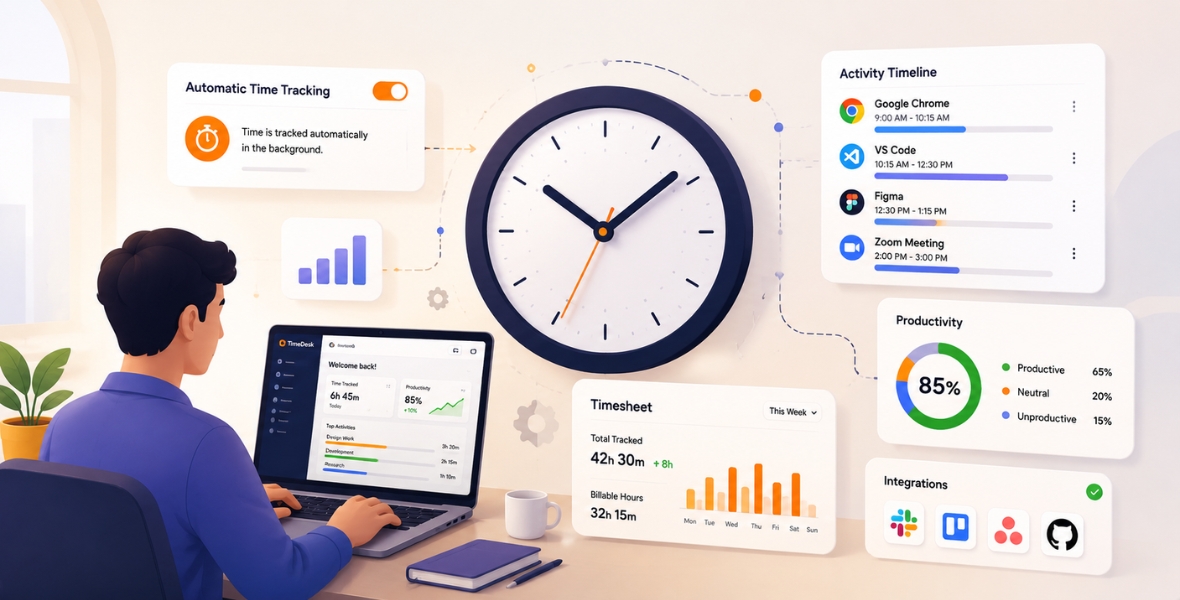
Automatic time tracking means software records work time as people work, so they don't have to rebuild their day from memory. In most tools, an employee starts a timer on a task once, and the app records time, removes idle periods and builds timesheets and reports on its own. The result is more accurate hours with far less manual entry.
Instead of asking people to remember every task and fill in a work log at the end of the day, an automatic time tracker captures time during the work itself. The exact method depends on the software. A tool may record work sessions, link time to projects and tasks, build an automatic timesheet or feed reports. The goal is simple: less repeated time entry and more consistent records.
This guide explains how automatic time tracking works, its benefits, the features that matter, common challenges and how to choose a tool. You can find more guides on the TimoDesk blog.
How is automatic time tracking different from manual tracking?
Manual time tracking asks employees or managers to type in hours themselves. For example, someone opens a spreadsheet and writes:
- Project A: 3 hours
- Client meeting: 1 hour
- Admin work: 2 hours
- Project B: 2 hours
The problem is that these numbers often come from memory. With automatic tracking, software records time as work happens. People may still review records or fix the odd mistake, but far less depends on memory.
Why are businesses adopting automatic time tracking?
Work is more scattered than ever. People move between projects, chat tools, apps, meetings and locations. Remote employee time tracking and hybrid work have created new visibility challenges. Businesses adopt automatic time tracking to improve:
- Employee time records
- Timesheet accuracy
- Project tracking
- Billable hours
- Payroll preparation
- Workforce reports
- Productivity analysis
- Overall efficiency
Quick summary: Automatic time tracking uses software to cut manual time entry and create consistent records. Used responsibly, it supports timesheets, projects, payroll and team management.
How does automatic time tracking work?
Every tool works a little differently, but most follow the same stages.
Step 1: Work begins
Tracking starts when an employee begins a work session. In many tools, including TimoDesk, the person starts a timer on a task in the desktop app. This marks when working time begins and which work it belongs to.
Step 2: Time is recorded
The app records time in the background while the person works. Many tools also remove idle time after a set period with no keyboard or mouse input. In TimoDesk, the idle timeout is 3 to 60 minutes, and idle time is always removed from tracked time.
Step 3: Time is linked to projects and tasks
Time is more useful when you know where it went. Project tracking links time to projects, clients, departments and tasks. This helps managers understand how people are allocated and how many billable hours each client used.
Step 4: Daily records build up
Tracked sessions build a clear daily record of who worked when and on what. Managers can review these patterns without collecting spreadsheets from everyone.
Step 5: An automatic timesheet is created
Timesheet automation turns time records into a clear employee timesheet. Nobody has to rebuild a whole week from memory. Corrections may still be needed now and then, so keep a simple process for real mistakes.
Step 6: Data syncs
Cloud-based tools sync records to a central system. This supports office, remote and hybrid teams alike. Some apps, like TimoDesk, keep tracking offline and sync when the computer reconnects.
Step 7: Reports are generated
Recorded data becomes reports on work hours, time use, project time, timesheets and productivity patterns. These reports support everyday decisions.
Expert tip: The value doesn't come from collecting the most data. It comes from collecting the right data and turning it into good decisions.
What are the benefits of automatic time tracking?
| Benefit | Business value | Main users |
|---|---|---|
| More accurate time records | Fewer memory-based guesses | Employees and managers |
| Fewer manual errors | More consistent work logs | HR and operations |
| Payroll support | Organized work-time data | Payroll teams |
| Productivity visibility | Shows time-use patterns | Managers |
| Project tracking | Shows time per project | Project teams |
| Workforce reports | Supports data-based decisions | Leadership |
| Live visibility | Current view of who is working | Operations |
| Easier growth | Less spreadsheet work | Growing businesses |
More accurate payroll records
Payroll depends on accurate hours. Errors in manual timesheets lead to wrong pay and extra checks. An automatic timesheet gives clearer records. It doesn't replace payroll rules or legal duties, but reliable hours make payroll easier.
Fewer human errors
People forget. After a busy day, someone may guess how long each task took. Those guesses make work logs wrong. Automatic tracking removes most of the guessing.
Better productivity visibility
Managers can see how work time is spread. Don't judge people on hours alone. Combine time with project results, finished tasks and quality for an accurate picture.
Better accountability
Clear records create visibility. Employees can check their own time, and managers can look into unusual patterns. Accountability works best when people know how tracking works and how the data is used.
Better project management
Project managers need realistic estimates. If you plan 100 hours but similar projects always take 180, your plans will keep failing. Past time data gives you better estimates. See how to track projects and deadlines.
Better compliance records
Some industries and countries require records of working time. Tracking software keeps them organized. Still, check the employment, privacy and data protection rules that apply to you.
Stronger workforce insight
Time data helps you ask better questions. Which teams often work overtime? Which projects go over their estimates? Is work shared fairly? Which processes take more time than expected? Data shows where to look; managers find the answers.
Live visibility
Teams work in many places. Live status and cloud access show what is happening now, without asking everyone for updates.
Possible cost savings
Manual admin takes time. HR collects timesheets, managers fix missing entries and payroll checks odd hours. Automating these steps cuts repeated work.
Manager tip: Work out what your current timesheet process really costs. Include time spent filling in, approving, fixing and checking. It is often more than you think.
How do manual and automatic time tracking compare?
| Comparison | Manual time tracking | Automatic time tracking |
|---|---|---|
| Data entry | Employee types in time | Software records time |
| Accuracy | Depends on memory | More consistent |
| Speed | Regular manual work | Little repeated entry |
| Human error | Higher risk | Lower risk |
| Payroll | Manual preparation | Clear records support payroll |
| Employee experience | Tedious entry | Less timesheet work |
| Growth | Hard for large teams | Suits growing teams |
| Reports | Spreadsheet math | Dashboard |
Is manual time tracking always bad?
No. A business with three people and simple schedules can do fine with manual timesheets. Problems appear as work gets more complex: more people, remote work, several projects, flexible hours and billable time.
When should a business consider automation?
- People often forget timesheets.
- Managers spend hours fixing records.
- Payroll keeps finding time differences.
- Projects often go over their estimates.
- You manage remote teams.
- People work across several projects.
- Reports depend on spreadsheets.
- The business is growing.
Common mistake: Don't buy a tracker just because automation sounds modern. Name the problem first, then pick a tool that solves it.
What are the 15 essential features of an automatic time tracker?
Not every tracker offers the same features. These are the ones that usually matter most. We note where TimoDesk does or doesn't offer them.
1. Easy start and stop
Starting and stopping work should take one click. Missing start or end times create incomplete timesheets. In TimoDesk, people start the timer on a task, and switching tasks is quick.
2. Idle time detection
Idle detection finds periods with no keyboard or mouse input and removes them. It makes records more accurate. Read idle time with care, though: reading, planning and offline talks may not show digital activity.
Tip: Never treat idle time as proof of low productivity. Check the context first.
3. Timesheets
Timesheets turn tracked hours into a clear format for payroll, project review and planning. TimoDesk's monthly timesheet downloads as PDF, for the whole team or per member. See timesheets and exports.
4. Project tracking
Project tracking links time to projects, so you can compare estimated and actual time. This matters most for software firms, agencies and service teams.
Example: An agency estimates 80 hours for a website. The tracker records 125 hours. Managers study the gap before pricing the next project.
5. GPS, where needed
Some field teams need location tracking. It needs careful privacy handling and legal review. TimoDesk has no GPS; it is built for computer-based work.
6. Attendance features
Some tools add attendance and schedule management. TimoDesk doesn't, but its Team Day timeline and time calendar show when people tracked time.
7. Payroll support
Clear hours make payroll easier. Check how a tool fits your payroll process. TimoDesk has no payroll, but its timesheets and CSV exports give your payroll system accurate hours.
8. Reporting dashboard
Raw time data is hard to read. A dashboard shows patterns at a glance, such as work hours, time per project and activity trends.
9. Productivity reports
Productivity reports help managers spot trends and unusual changes. Combine them with work results and context. Learn how to track the productivity of remote employees.
10. Screenshot options
Some tools take screenshots for extra context, which helps in remote or contract work. Share your screenshot policy clearly and respect privacy. In TimoDesk, screenshots start on for new members, are switched on or off per member and run every 3 to 60 minutes. See how screenshots prove work.
11. Work hour tracker
A work hour tracker records working time for project analysis and reports. It should be simple, so people don't spend time managing the tracker itself.
12. Task tracking
Task tracking links time to specific work, so you see which work takes the most time.
Example: A support manager finds that one admin process eats several hours each week. The team redesigns it.
13. Platform support
Check which devices the tool supports. Some offer mobile apps; others focus on desktop work. TimoDesk runs on Windows, macOS and Linux desktops, with no mobile app.
14. Notifications
Useful alerts reduce missing records without constant interruptions. TimoDesk can show an idle alert and a screenshot alert, and it sends a daily summary email to everyone who tracked time.
15. Cloud sync
Cloud sync keeps data in one place for remote and hybrid teams. TimoDesk syncs tracked time when the app reconnects, as long as that happens within 30 days.
Which features matter for which purpose?
| Feature | Basic purpose | Business value |
|---|---|---|
| Automatic tracking | Capture work time | Less manual entry |
| Timesheets | Organize work hours | Easier review |
| Project tracking | Link time to projects | Better estimates |
| Idle detection | Remove idle time | Accurate hours |
| Productivity reports | Show patterns | Better decisions |
| Cloud sync | Central data | Supports hybrid teams |
Who benefits most from automatic time tracking?
| Team | Main use | Useful tracking area |
|---|---|---|
| Remote teams | Visibility across locations | Time and productivity |
| Hybrid workplaces | Office and home work | Work hours |
| Software companies | Development projects | Project time |
| Agencies | Client work | Billable hours |
| Customer support | Service teams | Work patterns |
| Field teams | Mobile work | Time and location (needs a mobile tool) |
- Remote teams get work-time visibility without constant updates. Focus on outcomes and use tracking data as context.
- Hybrid workplaces keep one consistent record across office and home.
- Software companies understand development time and improve estimates.
- Agencies stop losing forgotten client time and see project profit clearly. See how to track billable hours accurately.
- Healthcare admin teams organize work-hour records, within their privacy rules.
- Customer support teams compare staffed hours with ticket volume and service results.
What are common challenges, and how do you solve them?
Privacy concerns
People may worry about too much monitoring. Explain what you collect, why, who can see it and how long you keep it. Collect only what serves a real business need.
Employee resistance
Some people see tracking as a sign of distrust. Explain the real reason, such as better estimates, fewer manual timesheets or fairer records.
Poor rollout
Installing software without rules creates confusion. Set roles, review steps and expectations first.
Tracking outside work hours
Tracking outside agreed hours raises serious privacy issues. Set clear boundaries. In TimoDesk, tracking only runs while the timer is on.
Wrong settings
Bad settings create misleading records. Test with a small team before rolling out to everyone.
Lack of training
Show people how tracking works, how to read their timesheet and how to report a wrong record.
Expert tip: A good rollout is mostly a management task. Settings matter, but communication, policy and training matter just as much.
What are the best practices for automatic time tracking?
- Define the purpose. Is it payroll records, billable hours, project costs or team capacity? Your goal shapes your settings.
- Write a clear policy. Explain what is tracked, when, why, who sees it, how to report errors and how the data is used.
- Track only what you need. More data is not always better.
- Train managers. Many tracked hours don't always mean high productivity, and low activity doesn't always mean poor work.
- Allow fair corrections. Give people a simple way to fix real errors. In TimoDesk, manual time is off until the organizer turns it on, then goes through approval.
- Combine time with outcomes. Compare time with finished projects, quality, customer results and goals.
- Review reports regularly. Check weekly or monthly, as your work needs.
- Protect the data. Limit access to the people who need it.
- Check the law. Tracking rules vary by country.
- Keep improving. Use feedback to adjust your setup.
How do you roll it out step by step?
- Pick a pilot team. Choose five to ten people with a clear tracking need, such as client billing.
- Write the policy. List what is tracked, when and why, and share it before day one.
- Set up projects and tasks. Mirror your real clients and work types, so time lands in the right place.
- Choose settings. Pick an idle timeout and screenshot settings that fit the work. Reading-heavy roles may need a longer idle timeout.
- Install and train. Show people how to start the timer, switch tasks and read their own reports.
- Review after two weeks. Check the data, ask for feedback and fix anything that feels wrong.
- Roll out wider. Share what you learned, then add the rest of the company.
Manager tip: Ask your team where manual time tracking frustrates them most. Their answers show you what to automate first.
How does automatic time tracking improve productivity?
Automatic time tracking doesn't make people more productive by itself. It gives managers and employees information they can use to improve how work gets done.
Better time awareness
People often underestimate how long small tasks take. A manager may find that recurring meetings use 12 hours per person each month. The fix isn't asking people to work faster; it is redesigning the meetings.
Fairer performance reviews
Time data, combined with task completion and quality, gives a balanced view of team productivity.
Fewer workflow delays
Tracking shows repeated delays. A software team may find that status updates eat into development time, then simplify them.
More accurate planning
Past time records lead to better estimates and schedules.
Fewer distractions through awareness
Seeing their own time use helps people work with intention. App and website usage shows broad patterns without blocking anything.
Better workload balance
If one person often works late while another has room, the issue is how work is assigned. Time data helps managers see it.
Quick summary: Automatic time tracking improves productivity indirectly. It shows where time goes, so you can fix processes, plan better and balance workloads.
How do you choose the right time tracking software?
- Ease of use: Tracking shouldn't become another chore.
- Automation: Know which steps are automatic and which still need input, such as starting a timer.
- Security: Check access controls and data practices.
- Growth: Make sure it works for your team in two years, not just today.
- Integrations: Don't assume every tool connects to everything. Check what you need.
- Pricing: Compare total cost, including admin time saved.
- Support: Check what help is available during setup.
- Reports: Pick a tool that makes data easy to understand.
Why do businesses choose TimoDesk?
TimoDesk is a time tracking and productivity tool for remote teams and staffing agencies. People start the timer on a task, and TimoDesk handles the rest in the background.
| TimoDesk area | How it helps |
|---|---|
| Time tracking on tasks | Records time in the background; idle time is removed on its own |
| Activity levels | Share of tracked time with keyboard or mouse input; typing is never recorded |
| App and website usage | Shows the tools and sites used while tracking |
| Screenshots | Optional proof of work, set per member |
| Timesheets and reports | Monthly timesheets as PDF; reports as PDF or CSV |
| Team dashboard | Live Now, Team Day timeline and an Action Center |
TimoDesk doesn't replace management judgment. It provides the data; managers bring the context and make fair decisions. It costs $1 per user per month, with every feature on one plan. Learn more about time tracking in TimoDesk.
Final thoughts
Automatic time tracking is changing how businesses record and understand work time. Manual timesheets still work for small, simple teams. Growing companies, remote teams, agencies and hybrid workplaces usually need more consistent data. A good tracker cuts data entry, builds timesheets, improves project tracking and gives clearer reports. But technology alone isn't enough. You also need clear policies, good settings, open communication and fair managers who combine time with real outcomes. To try it, start a 15-day free trial of TimoDesk with no card needed.
Frequently asked questions
What is automatic time tracking?
It is software that records work time as people work, with little manual entry. It can link time to projects, build timesheets and feed reports.
Do you need to start a timer in TimoDesk?
Yes, once per task. People start the timer on a task in the desktop app. After that, TimoDesk records time in the background and removes idle time on its own.
Is automatic time tracking legal?
It depends on your country and what you collect. Share your policy clearly, collect only what you need, protect the data and check local laws first.
How does an automatic timesheet work?
It turns recorded time into a clear timesheet, so nobody has to remember a whole week. Managers can then review it before using it for reports or payroll.
Can automatic time tracking track billable hours?
Yes, when time is linked to clients or projects. Agencies can then review client time before they send invoices.
Was this helpful?
Share it with someone who still adds up hours by hand.


