
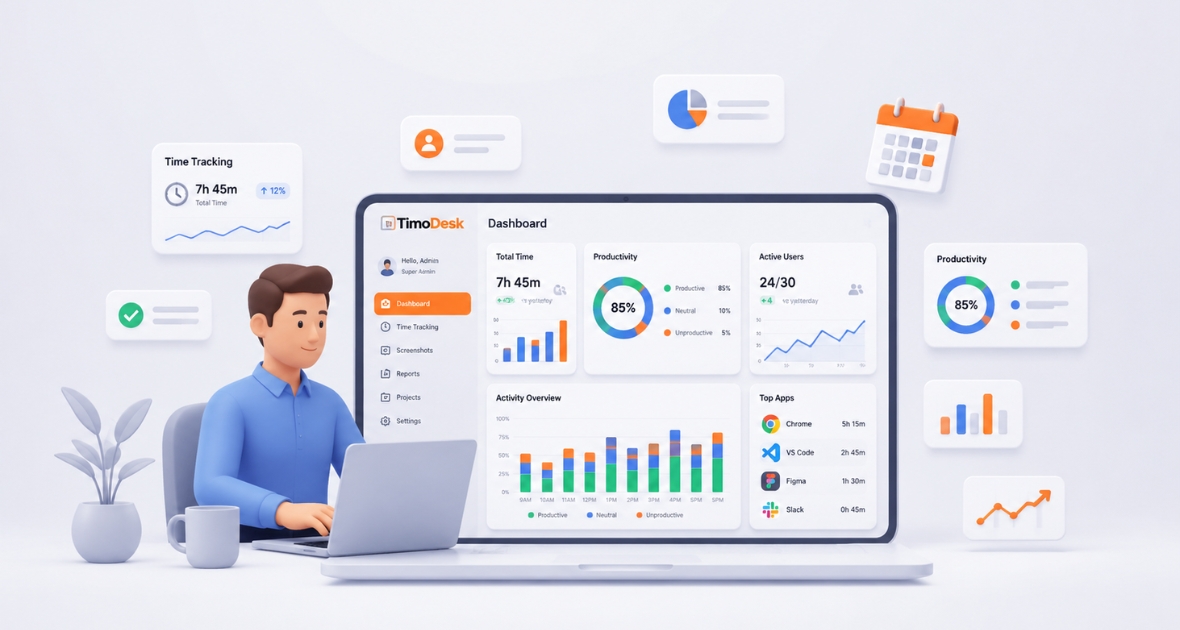
Computer monitoring software records work-related activity on company computers, such as work time, apps, websites and activity levels, and turns it into reports. It helps managers see how work gets done, spot bottlenecks and keep remote teams accountable. TimoDesk does this by tracking time on tasks, with activity levels, app and website usage and screenshots, for $1 per user per month.
Employee productivity is one of the most important measures for any business. Whether your team works in an office, remotely or in a hybrid setup, knowing how work hours are spent helps you work more efficiently, cut costs and support your people better.
Why does computer monitoring software matter today?
Modern monitoring tools do more than log activity. They show productivity, work patterns and project progress. Used openly and fairly, they help businesses make better decisions and give employees the data to manage their own workload.
TimoDesk follows this balanced approach. It combines time tracking, activity levels, app and website usage, screenshots, projects and reports in one tool. In this guide, you'll learn what computer monitoring software is, how it works, which features matter and how TimoDesk helps teams become more productive.
What is computer monitoring software?
Computer monitoring software is a business tool that records work-related computer activity. It helps companies understand productivity, track work hours, see app and website usage and build performance reports. Instead of guessing or relying on self-reports, businesses get measurable data about the workday.
Computer monitoring software helps organizations record work-related computer activity, measure productivity, improve accountability and plan better, using live data and reports.
Good tools focus on productivity, not surveillance. Their purpose is to improve workflows, find bottlenecks and help people focus on high-value work.
How does computer monitoring software work?
Most tools use a light desktop app installed on work computers. In TimoDesk, the employee starts the timer on a task in the desktop app. While the timer runs, the app records work activity and sends it to a dashboard where managers review reports and trends.
Typical data includes:
- Active work time
- App usage
- Website visits
- Idle time
- Time per project and task
- Activity trends
- Team reports
Managers don't watch people all day. They get summaries that help them understand work habits and improve how the team runs.
Why do businesses use computer monitoring software?
Companies use employee computer monitoring software for many reasons beyond tracking activity:
- Improving productivity
- Supporting remote teams
- Making payroll easier
- Replacing manual timesheets
- Seeing project progress
- Planning resources
- Finding workflow bottlenecks
- Supporting compliance
- Making performance reviews fairer
Combined with time tracking and project management, monitoring data becomes a decision tool, not just a report. For remote teams in particular, see our guide to remote employee time tracking.
What are the core parts of modern monitoring software?
Time tracking
Time tracking records working hours so employees don't have to fill in timesheets by hand. It supports accurate pay, better project estimates and less admin. In TimoDesk, the employee starts the timer on a task, and idle time is removed on its own. Managers can review detailed work history at any time.
App monitoring
App tracking shows which software people use during tracked time, such as Microsoft Excel, Adobe Photoshop, Visual Studio Code, Slack, Zoom or Chrome. Managers see how business tools support the work without asking for reports.
Website monitoring
Website tracking shows the sites people visit while working. In TimoDesk, it records the website, the page address, the page title and the browser, but never the content of the page. Whether a site is useful depends on the role:
| Website type | Typical business value |
|---|---|
| CRM systems | Usually core work |
| Project management tools | Usually work |
| Company knowledge base | Usually work |
| Social media | Depends on the role |
| Video streaming | Usually not work-related |
TimoDesk doesn't label sites as productive or unproductive. You read the data in the context of each person's job. Learn more about employee website monitoring.
Activity levels
Activity level is the share of tracked time with any keyboard or mouse input. TimoDesk never records what someone types. Activity levels help you spot long idle periods, interruptions, focus time and daily patterns.
Read these numbers in context. Reading documents, joining calls or planning work may involve little typing but still be real work.
Screenshots
Screenshots give visual proof of work. In TimoDesk, they start on for new members and are switched on or off per member. The interval runs from 3 to 60 minutes, and an alert can tell members when one is taken. Screenshots taken while a member is idle are thrown away, so they only show real work. Read how teams track employee work with screenshots.
Reports
Reports are one of the most useful parts of any monitoring tool. Good dashboards show daily and weekly trends, team comparisons, time per project, app usage, websites and how work hours are spread. These reports let managers decide with data instead of guesses.
Why do businesses need computer monitoring software?
Work has changed. Remote work, hybrid schedules, flexible hours and distributed teams bring new challenges. Without good visibility, it is hard to measure productivity, allocate resources, follow projects, calculate billable hours, find bottlenecks, balance workloads and support remote teamwork.
Managing remote and hybrid teams
Remote work makes traditional supervision less effective. Managers need answers to questions like these:
- Are projects on schedule?
- How are people spending their work hours?
- Which tasks take the most time?
- Are teams overloaded or underused?
Remote team monitoring gives objective answers without constant check-ins. With TimoDesk, managers see work hours, activity trends and project progress on one dashboard. Read more on how to monitor remote employees fairly.
Reducing time theft and inaccurate timesheets
Manual timesheets are full of errors and forgotten entries. Tracking time as people work captures real hours, cuts pay disputes, improves billing accuracy and reduces admin. Businesses get reliable records for payroll, invoicing and projects.
Improving transparency
Good monitoring is about transparency, not surveillance. When employees know what is tracked, why and how the data is used, monitoring can build trust. Clear policies and open talk make sure it supports productivity, fairness and growth.
What are the key features of computer monitoring software?
Real-time activity view
Live dashboards show ongoing work without manual updates: who is working now, active and idle time and team availability. Managers can spot problems early and help in time. In TimoDesk, Live Now and the Live Team Monitor browser extension show who is working right now.
App and website tracking
Seeing how people use apps and websites reveals the most-used business tools, chances to simplify your software, training needs, possible distractions and workflow improvements. See how this works in app and website usage.
Time tracking
Built-in time tracking replaces manual timesheets. Look for idle time detection, time per task and project and timesheets you can hand to payroll.
Productivity analytics
Analytics turn raw data into insight. Managers can spot strong teams, long-term trends, project efficiency, resource use and ways to improve processes.
Central reporting dashboard
A good dashboard brings monitoring, productivity and project data into one place. TimoDesk's dashboard shows key figures with trends, a Team Day timeline, Time Allocation, a Performance Map and an Action Center that flags overdue tasks, low-activity members, long workdays and tasks over estimate.
How does TimoDesk improve employee productivity?
Productivity improves when you have accurate, useful insight into how work is done. The goal isn't to watch every click. It is to remove bottlenecks, improve workflows and help people focus on meaningful work.
Real-time visibility into daily work
Understanding how work moves during the day is hard, especially for remote teams. TimoDesk shows who is working now, active hours, current tasks, activity trends and team workload. Managers don't wait for weekly updates; they can help as soon as something slips.
Example: A software company sees one project falling behind. On the dashboard, the project manager finds that several developers spend a lot of time on unplanned support tasks. Work is shifted, and the project gets back on schedule without overtime.
Time tracking on tasks
Manual timesheets lead to wrong records and extra admin. In TimoDesk, people start the timer on a task, and the app records time in the background. That makes it easier to track billable time, prepare payroll, measure project effort and report accurately.
Better employee accountability
Healthy accountability is built on transparency. Monitoring sets clear expectations around hours, project progress and task completion. Employees benefit too: expectations become more objective, achievements are backed by data and reviews rely on evidence.
Productivity analytics for better decisions
TimoDesk turns activity data into simple reports: daily trends, weekly and monthly performance, team comparisons and project time. Managers can see which projects need more people, where training would help and which workflows cause delays. Learn more about reports and analytics.
Improved project time allocation
TimoDesk shows time per project, per task and per person, plus team workload. Task estimates are flagged when tracked time goes over. These insights improve future estimates and help you allocate people better.
Supporting remote teams
Remote teams need visibility without constant meetings. With TimoDesk, remote staff track time on tasks, share progress through reports and stay accountable without extra check-ins. The app keeps tracking offline and syncs when it reconnects.
Performance insights without micromanagement
TimoDesk focuses on trends rather than single moments. Managers review long-term improvements, workload balance, project progress and team performance. The monthly leaderboard and top and low performer lists support coaching, not punishment.
What are the benefits of computer monitoring software?
With clear policies and open communication, computer monitoring software brings real benefits:
- Higher productivity: People see how they use their time, and managers find slow workflows and repeated tasks.
- Fewer distractions: App and website data shows patterns, so you can guide habits instead of blocking sites.
- More accurate pay: Recorded hours cut pay disputes, manual math and missing timesheets.
- Better resource allocation: See who is overloaded and who has room, and reduce burnout.
- Better project management: Time by project shows progress, profitability and risks before deadlines slip.
- Stronger accountability: Shared, open data builds shared responsibility.
- Better decisions: Reports support hiring, training and planning.
- Remote visibility: One consistent way to measure work across locations.
- Audit support: Organized records help with audits and reporting.
- Lower costs over time: Better productivity and less admin save money.
How is computer monitoring software different from time tracking software?
The terms are often mixed up, but they serve different purposes. Many teams benefit from a tool like TimoDesk that does both.
| Feature | Computer monitoring software | Basic time tracking software |
|---|---|---|
| Tracks computer activity | Yes | Limited |
| Records working hours | Yes | Yes |
| App monitoring | Yes | Usually no |
| Website tracking | Yes | Usually no |
| Productivity analytics | Yes | Limited |
| Project time tracking | Often | Yes |
| Idle time detection | Yes | Sometimes |
| Performance insights | Yes | Limited |
| Best for | Managing team productivity | Recording time |
Key takeaway: Time tracking software mainly records hours. Computer monitoring software gives a wider view of activity, productivity and performance. Teams that want both often choose a tool that combines them.
Who should use computer monitoring software?
Almost any business that runs on computers can benefit, if it picks the right features and uses them openly.
- Small businesses improve productivity, client billing and planning without extra admin staff.
- IT and software companies get project tracking, time allocation and sprint data.
- Marketing agencies measure billable hours, campaign effort and team use across clients.
- Call centers and BPOs get live visibility and activity reports.
- Healthcare admin teams improve operational reporting while meeting compliance needs.
- Schools and training groups manage admin staff and remote support teams.
- Engineering and construction offices track project time for designers, estimators and coordinators.
- Remote and hybrid companies keep visibility without constant meetings.
- Large companies standardize reports and planning across departments.
How do you monitor employees ethically?
Monitoring works when people trust it. Employees accept it much more easily when you are open about its purpose.
Be transparent
Explain what data you collect, why you collect it, how you use it and who can see it. Openness builds confidence.
Focus on productivity, not surveillance
Use reports to find trends and chances to improve, not to pick apart single moments.
Respect privacy
Collect only work-related data you truly need. In TimoDesk, tracking only runs while the timer is on, and screenshots taken during idle time are thrown away. Follow local privacy laws.
Create clear policies
Write down your rules on computer use, monitoring, data retention, employee rights and security. Review them often and make sure people understand them.
Use data for coaching
Use reports to find training needs, improve workflows, recognize good work, balance workloads and support careers.
How do you choose the best computer monitoring software?
Compare more than feature lists. The right tool fits your goals, supports your team and gives useful insight without extra complexity.
1. Check the core features
- Time tracking on tasks and projects
- Activity levels
- App and website tracking
- Idle time detection
- Screenshots with per-person settings
- Reports and timesheets you can export
2. Put ease of use first
Look for a clean dashboard, easy install, simple reports and little training. Adoption depends on how quickly people can start.
3. Review reports and analytics
Look for daily, weekly and monthly views, team comparisons, project time and work-hour analysis.
4. Plan for growth
Can it handle remote teams, several teams and role-based access? Does the price stay simple as you add people?
5. Check security
Look for secure data handling, role-based permissions and clear storage options. TimoDesk explains its approach on the security page.
6. Check integrations if you need them
If your team depends on payroll, HR or project tools, check which ones each product connects to. TimoDesk has no integrations yet, but its reports download as PDF or CSV.
7. Run a real trial
Test the tool with a small group for a week or two. Check how easy the desktop app is to install, how clear the reports are and how the team feels about it. Ask people what they think before you roll it out to everyone.
8. Compare support
Check documentation, response times and how often the product improves.
9. Understand pricing
Compare the features included, user limits, upgrade costs and storage. The plan you actually need matters more than the entry price.
Why does TimoDesk stand out?
- Clear visibility: Work hours, project activity, activity levels, app usage and team performance in one place.
- Built for remote, hybrid and office teams: Desktop apps for Windows, macOS and Linux, with offline tracking.
- Time tracking on tasks: People start a timer on a task, and idle time is removed on its own.
- Useful analytics: A Performance Map, top and low performer lists and an Action Center.
- Timesheets for payroll: Monthly timesheets as PDF and reports as PDF or CSV, for use in your own payroll system. See how monthly timesheet automation works.
- Simple price: $1 per user per month, every feature on one plan.
TimoDesk helps answer key questions: Are projects on schedule? Is work shared fairly? Where can productivity improve? How can managers better support their people?
Conclusion
A good rollout is simple. Explain the goals, set screenshot and idle settings per member on the Team Tracking Policy page, and review trends weekly. Within a month, most teams have a clear picture of where their time goes.
Managing today's teams takes more than counting hours. You need insight into how work is done, where to improve and how to support people. Computer monitoring software gives that visibility by combining time tracking, activity data and reports. Used openly and fairly, it improves accountability, workflows and decisions.
TimoDesk brings time tracking, activity levels, app and website usage, screenshots, projects and reports together in one tool for office, remote and hybrid teams. Start a 15-day free trial with no card needed.
Frequently asked questions
What is computer monitoring software?
It is software that records work-related computer activity, such as work time, apps and websites. It helps businesses measure productivity and manage teams with data.
How does employee computer monitoring software work?
A light desktop app records activity like active time, app usage and websites. In TimoDesk, this happens while the timer runs on a task, and managers see the results in reports.
Does computer monitoring software improve productivity?
Yes, when it is used openly. It reveals slow workflows and distractions, improves accountability and supports better planning.
Is employee monitoring legal?
In many places, yes, for legitimate business reasons and when you follow labor and privacy laws. Tell employees what you monitor, and get consent where the law requires it.
Does TimoDesk record keystrokes or track attendance?
No. TimoDesk counts whether there was keyboard or mouse input but never records what someone types. It has no attendance management; it tracks time on tasks.
Was this helpful?
Share it with someone who still adds up hours by hand.


