
Referral program
The TimoDesk referral program gives you account credit for bringing in other organizations. Share your referral link. When an organization signs up through it and makes its first payment, TimoDesk adds a flat credit, currently $10, to your account credit. That credit pays your own invoices.
Who can use it: Organizers only. Open Settings > Account and click the Referral Option tab.
Where to find your referral link and code
Your referral link and code are on the card at the top of the tab, Invite other organizations to TimoDesk. The card also shows the credit you earn for each paying organization.
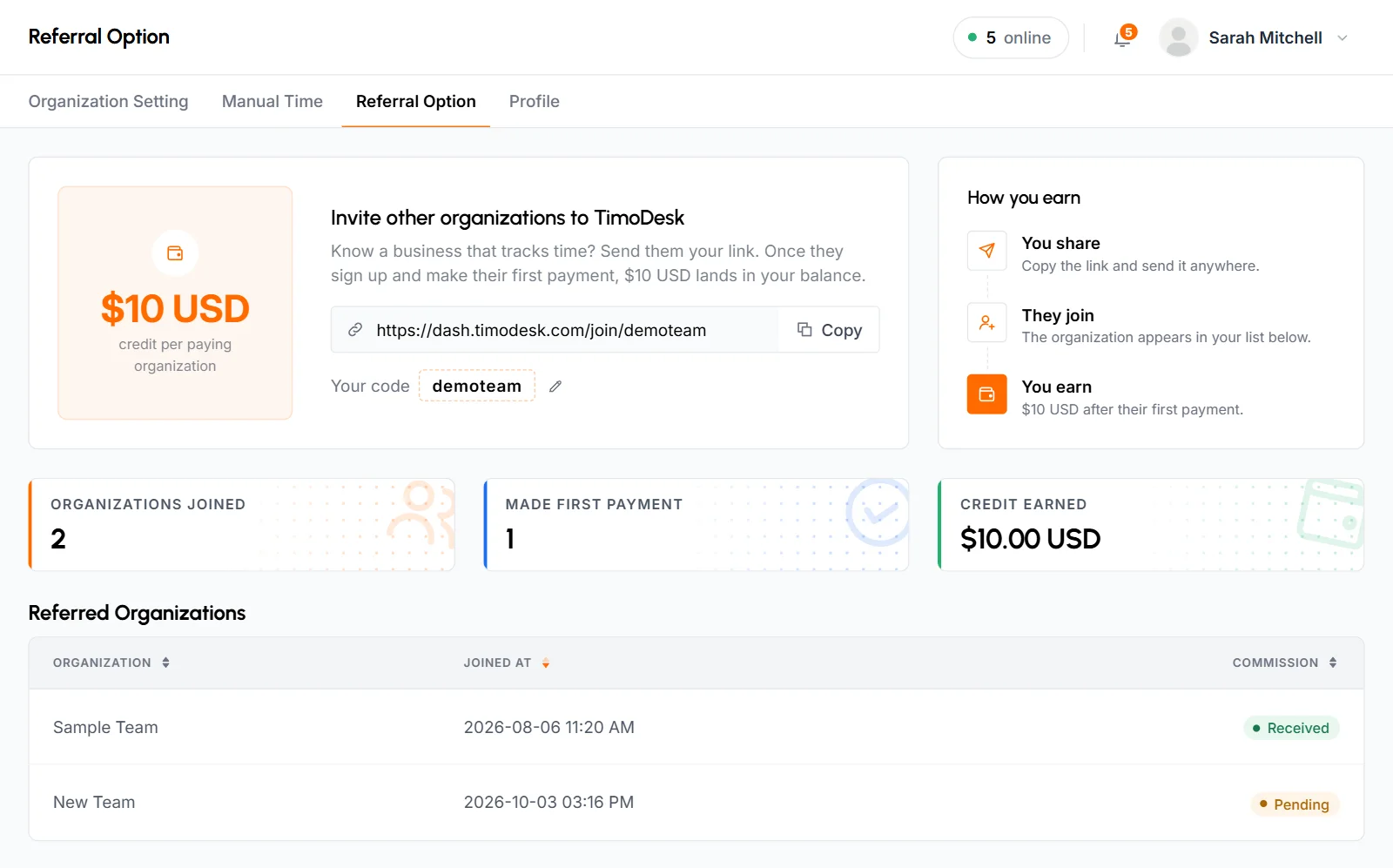
- Your link looks like
https://dash.timodesk.com/join/your-code. Click Copy to copy it, then share it any way you like: email, chat, social media or your website. - TimoDesk gives each organization a random 6-character code when it's created. Your code shows it under the link. Click the pencil icon next to it to change it.
- TimoDesk uses the code to connect a new organization to yours. When you change the code, your link changes too.
How to change your referral code
-
Open the Change referral code popup
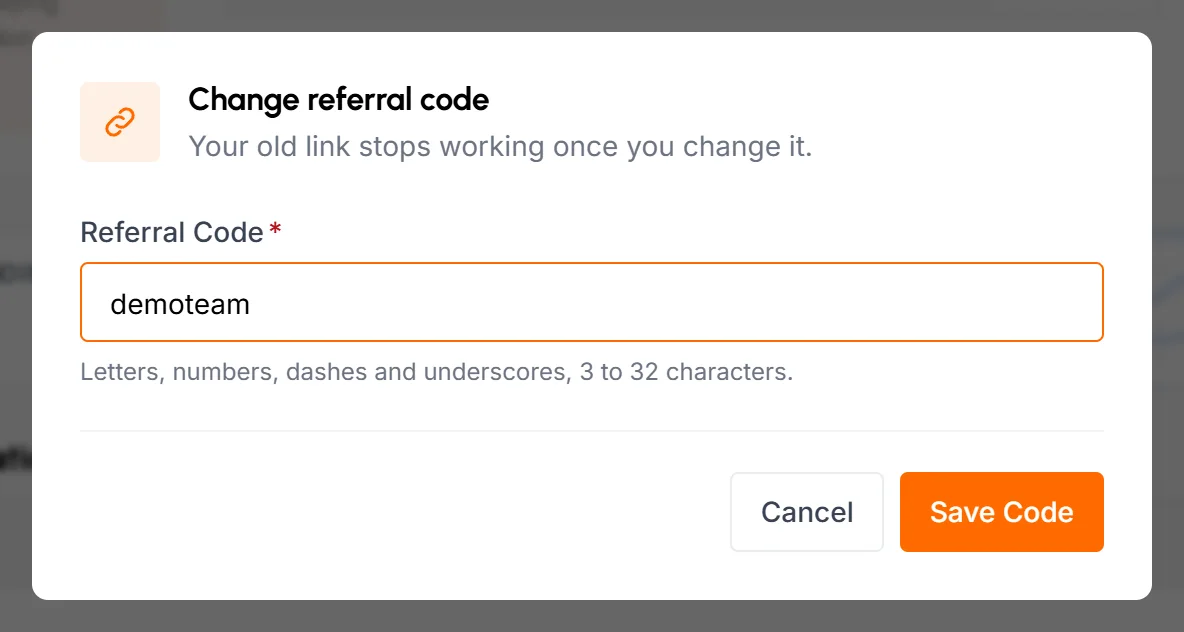
Click the pencil icon next to Your code. The popup warns you that your old link stops working after you change the code.
-
Type the new code
In Referral Code, use 3 to 32 characters: letters, numbers, dashes and underscores. Don't use spaces or accents. TimoDesk saves codes in lowercase. While you type, it checks the code and shows "This code is available." or "This code is already taken."
-
Save
Click Save Code. The popup closes, and the code and link on the page update right away.
Your old link stops working as soon as you save. Anyone who opens it after that won't be linked to your organization, so update every place where you shared it.
How you earn referral credit
The How you earn panel shows the 3 steps:
- You share: copy the link and send it anywhere.
- They join: the organization appears in your Referred Organizations list.
- You earn: the credit goes into your balance after their first payment.
How a sign-up is linked to you
A new organization is linked to yours when someone opens your link and creates their organization in the same browser within 72 hours. When they open your link, TimoDesk saves your code in their browser for 72 hours and sends them to the TimoDesk website. The sign-up page tells them which organization referred them.
- The link happens when they submit the organization form, not when they open your link.
- Your organization must be active at that moment. If it's suspended for unpaid billing, the new organization isn't linked to you.
- If they sign up in another browser, after 72 hours or after clearing cookies, you lose the referral. Nobody can add a referral later.
- Each organization can have only 1 referring organization.
- A TimoDesk Partner comes first. If the new organization came through a partner's link or used a partner's coupon code at sign-up, it's credited to that partner and isn't linked to you. It doesn't appear in your Referred Organizations list. See how the Partner program differs.
When do I earn a referral commission?
You earn when a referred organization makes its first successful card payment to TimoDesk, either for an invoice or to add credit. The commission is a flat amount per organization, currently $10. It isn't a percentage of what they pay.
- The credit goes to your organization's account credit and pays your invoices. It's also used automatically when TimoDesk issues a new invoice.
- You get a notification, "Referral commission received", and an email.
- On the Transactions page, it shows as "Referral credit from" followed by the organization's name.
- You earn once per referred organization. Their later payments don't earn more.
- You don't earn anything for a referred organization that's still on its free trial or never pays.
- You don't earn anything for an organization that's credited to a TimoDesk Partner. TimoDesk pays once for each new organization, so the partner's commission replaces your referral credit.
What your referral stats show
- Organizations joined
- How many organizations signed up through your link.
- Made first payment
- How many of them have made at least 1 successful payment.
- Credit earned
- The total referral credit added to your balance.
How to see the organizations you referred
The Referred Organizations list shows every organization that joined through your link, newest first. You can sort it by any column.
- Organization
- The name of the referred organization.
- Joined At
- The date and time they created their organization.
- Commission
- Pending until the organization makes its first successful payment. After that, it shows Received.
If nobody has joined through your link yet, the list shows No Referred Organization Found.
Common questions
How much do I earn per referral?
You get a flat credit per referred organization, currently $10, once that organization makes its first successful payment. The card on the Referral Option tab always shows the current amount.
Can I withdraw referral credit as cash?
No. TimoDesk adds referral credit to your account credit, and it pays your invoices. To earn commissions you can withdraw, see the separate TimoDesk Partner program.
Why doesn't a new organization appear in my list?
They probably signed up in a different browser, more than 72 hours after opening your link or after you changed your code. Your organization also has to be active when they create theirs. A sign-up that came through a TimoDesk Partner link or partner coupon is credited to that partner instead.
Can Business Managers see the referral program?
No. Only the Organizer sees the Referral Option tab.