
Weekly worklog
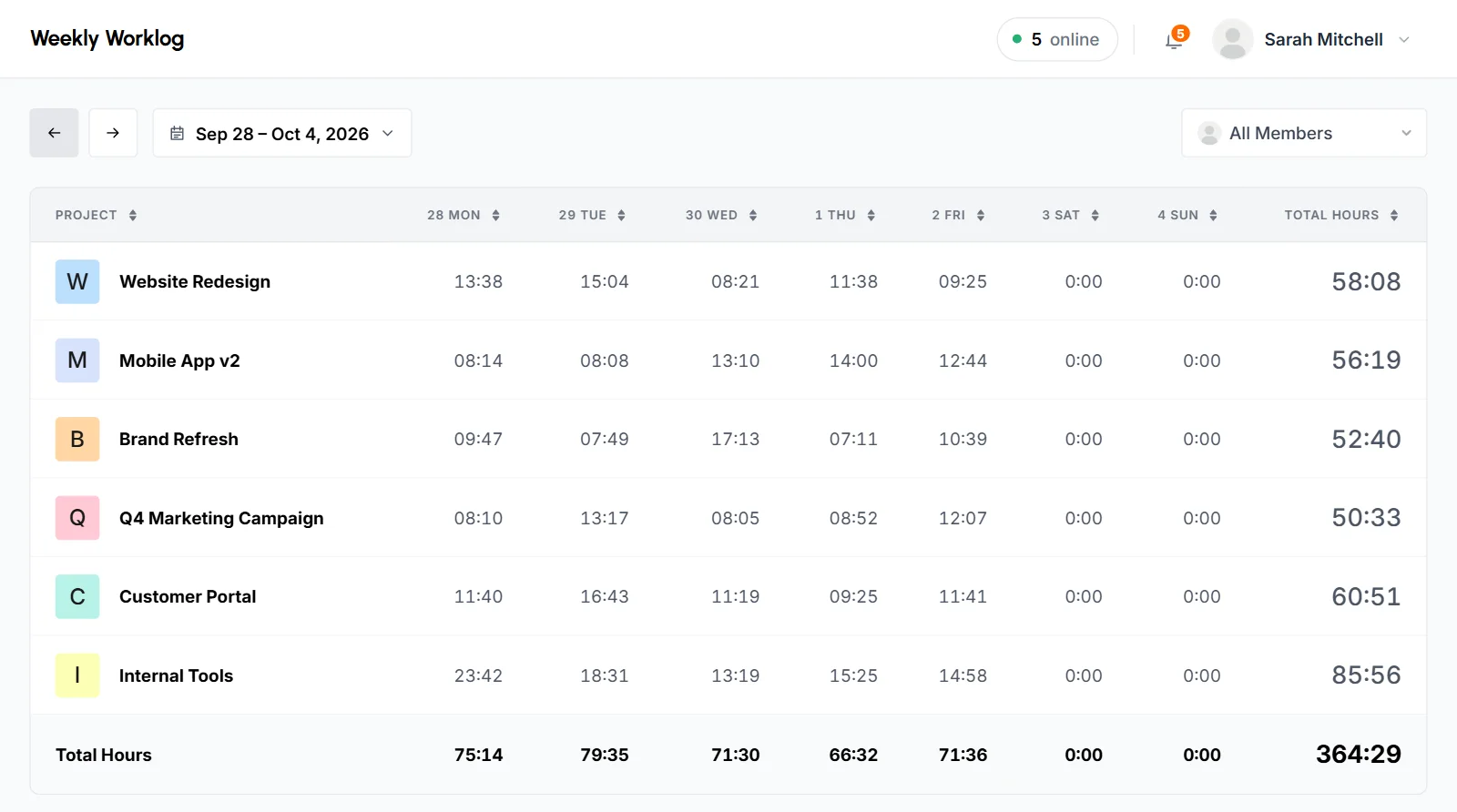
The Weekly Worklog is a timesheet table of the time tracked on each project, day by day, for 1 week. It shows a total for each day and for the whole week, so you can see where a week's hours went.
Who can use it: Everyone. Organizers and Business Managers see the whole organization. Team Managers see themselves and the members of the teams they manage. Staff see only their own time.
How to read the weekly worklog table
The table has 1 row per project and 1 column per day, with totals at the right and bottom. Open Weekly Worklog under Analytics in the sidebar. The page opens on the current week.
- Project
- 1 row for each project with tracked time that week. Click a project's name to open its page. Time with no project shows as "Unknown Project".
- Day columns
- 7 columns, 1 for each day of the week, with the date and weekday at the top (for example "21 Sun"). The first column is the day your organization's week starts on.
- Total Hours column
- Each project's total for the week.
- Total Hours row
- The last row adds up all projects for each day. Its last cell is the total for the whole week.
Only projects with time that week get a row. A week with no tracked time shows "No weekly worklog found".
What the numbers mean
- Time shows in hours and minutes (HH:MM). Hours keep counting past 24, so a busy project can show a weekly total like 41:30. TimoDesk drops leftover seconds and doesn't round them up.
- A day with no time on a project shows
0:00. - Each day runs from midnight to midnight in your organization's time zone.
- The worklog shows time only, not activity. It includes approved manual time, on the project and day it was logged for. See how time and activity are calculated.
How to pick a week and a member
- Previous and next arrows
- Move 1 week back or forward. The next arrow is disabled on the current week, so you can't open a week that hasn't started.
- Week picker
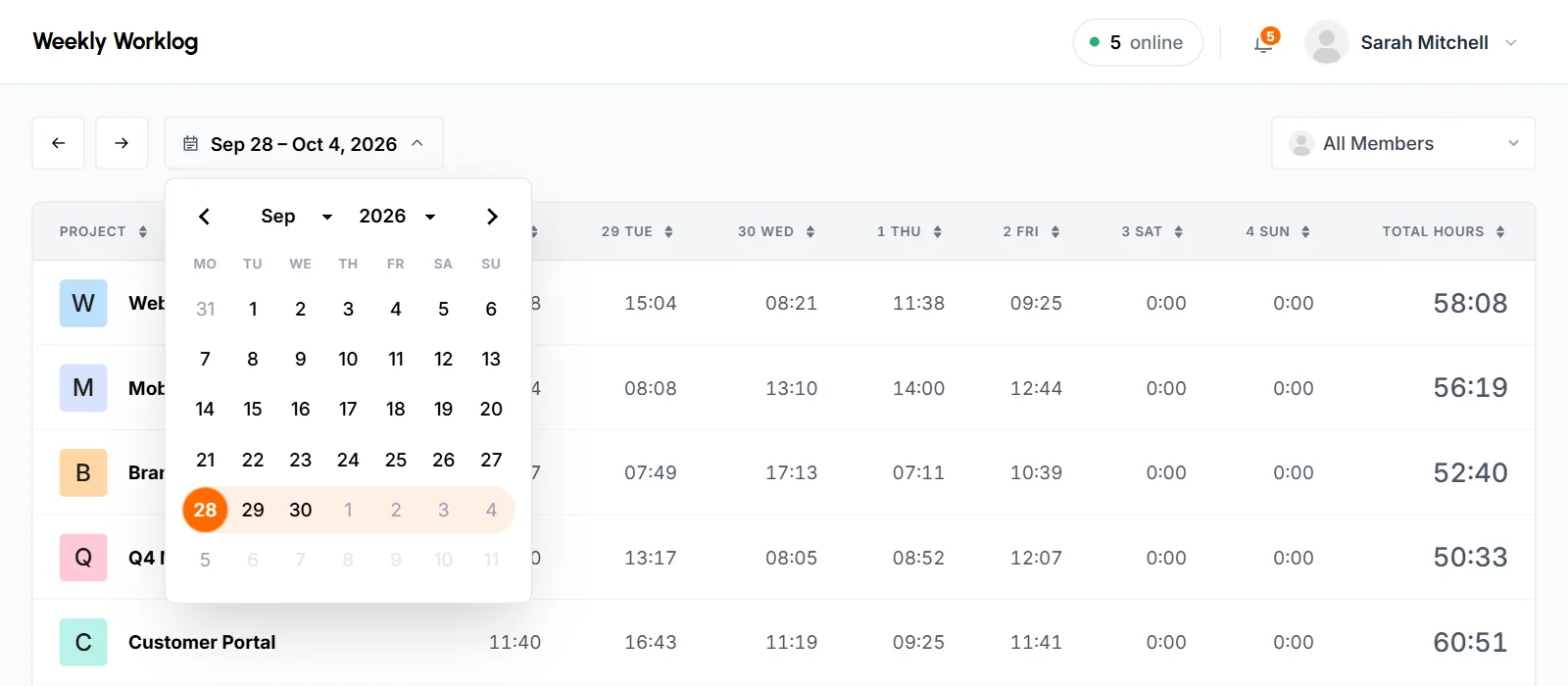
- Click the dates next to the arrows to open a calendar. The week you're viewing is highlighted. Pick any day, and the worklog loads the week that contains it. You can't pick days after today.
- Member filter
- Keep All Members to see everyone you have access to, or pick 1 member to see only their time. The list shows active members only. Time from members who were disabled later still counts under All Members.
To go straight to one member's worklog, open the ⋮ menu on their row in the Members list and choose Weekly worklog.
How to sort the table
Click a column heading to sort by it. Project sorts by name. The day columns and Total Hours sort by time. The first click sorts from lowest to highest, and the next click reverses the order. The Total Hours row always stays at the bottom.
The sort resets when you load another week or member.
How to change the first day of the week
Change it in Week starts on in your organization settings. Weeks start on Sunday unless your organization picks another day. The setting applies to everyone in the organization.
- Click Account under Settings in the sidebar. The Organization Setting tab opens.
- Choose a day in Week starts on.
- Click Save Changes.
The new start day applies to the Weekly Worklog, the Time Calendar grid and the weekly summary email.
Only the Organizer can change it. Business Managers can see the current setting on the same page.
What Staff see
Staff see only their own week. They have the arrows and the week picker, but no member filter.
Daily and weekly summary emails
TimoDesk emails a summary of tracked time once a day, for the day before, and once a week, for the week before. You don't need to set anything up.
| Who gets it | What it shows | |
|---|---|---|
| Your daily summary | Everyone who tracked time the day before | Their own Time, Activity and Tasks, then Top projects, Top tasks, Top apps and Top websites. |
| Daily team summary | Organizers, Business Managers and Team Managers | How many Members tracked time, the team's Time and Activity, then Top members, Top projects, Top tasks, Top apps and Top websites. |
| New members summary | Organizers and Business Managers | The members who joined the day before, with each one's name and role, and a Review members button. TimoDesk sends it only on days after someone joined. |
| Your weekly summary | Everyone who tracked time the week before | The same figures as your daily summary, for the whole week. |
| Weekly team summary | Organizers, Business Managers and Team Managers | The same figures as the daily team summary, for the whole week. |
- Daily summaries go out once a day, after midnight in your organization's time zone. They cover the day that ended at that midnight.
- Weekly summaries go out on your organization's first day of the week (the Week starts on setting). They cover the 7 days before it. With the default Sunday start, Sunday's email covers the previous Sunday to Saturday.
- A Team Manager's team summary covers the Team Manager and the members of the teams they manage. Organizers and Business Managers get the whole organization.
- Each top list shows up to 5 items, ranked by time, with a bar for each one. Members, projects and tasks also show their activity. A button at the end opens the Time & Activity report.
- TimoDesk sends no summary for a day or week with no tracked time.
- Approved manual time counts toward time. It's left out of the activity figures, because it has no keyboard or mouse input to measure.
- Only active members with a verified email get summaries. Disabled members and members waiting for approval don't get them.
When to use the Weekly Worklog
- Check which projects got a week's hours before a weekly review.
- Find days with no tracked time on any project.
- Change the member filter to see one person's week, project by project.
To see a whole month, use the Time Calendar. For any date range, use Project Timing. For each member's daily hours across a month, use the Monthly Timesheet.
Common questions
Why doesn't a day's total match the cells above it?
TimoDesk adds up totals from seconds, then shows them in hours and minutes. The seconds dropped from each cell can add up to an extra minute in the total.
Does the Weekly Worklog include manual time?
Yes. Approved manual time counts toward the project and the day it was logged for.
Can I export the Weekly Worklog?
No, this page has no export. To get a file, export the Time & Activity report or download the Monthly Timesheet.
Why can't I go to next week?
The worklog stops at the current week. The next arrow works again when the next week starts.