
Sign up and create your organization
To sign up for TimoDesk, create an account with your name, email and a password, then fill in a short form about your organization. TimoDesk then creates your organization, starts a 15-day free trial with every feature and opens your dashboard. You don't need a credit card.
Who can use it: Anyone who wants to start a new organization. The person who registers becomes its Organizer and owner. If someone already invited you to their organization, don't register here. Accept the invitation instead (see Members).
How to create your TimoDesk account
You create your account on the sign-up page with your name, email and a password.
-
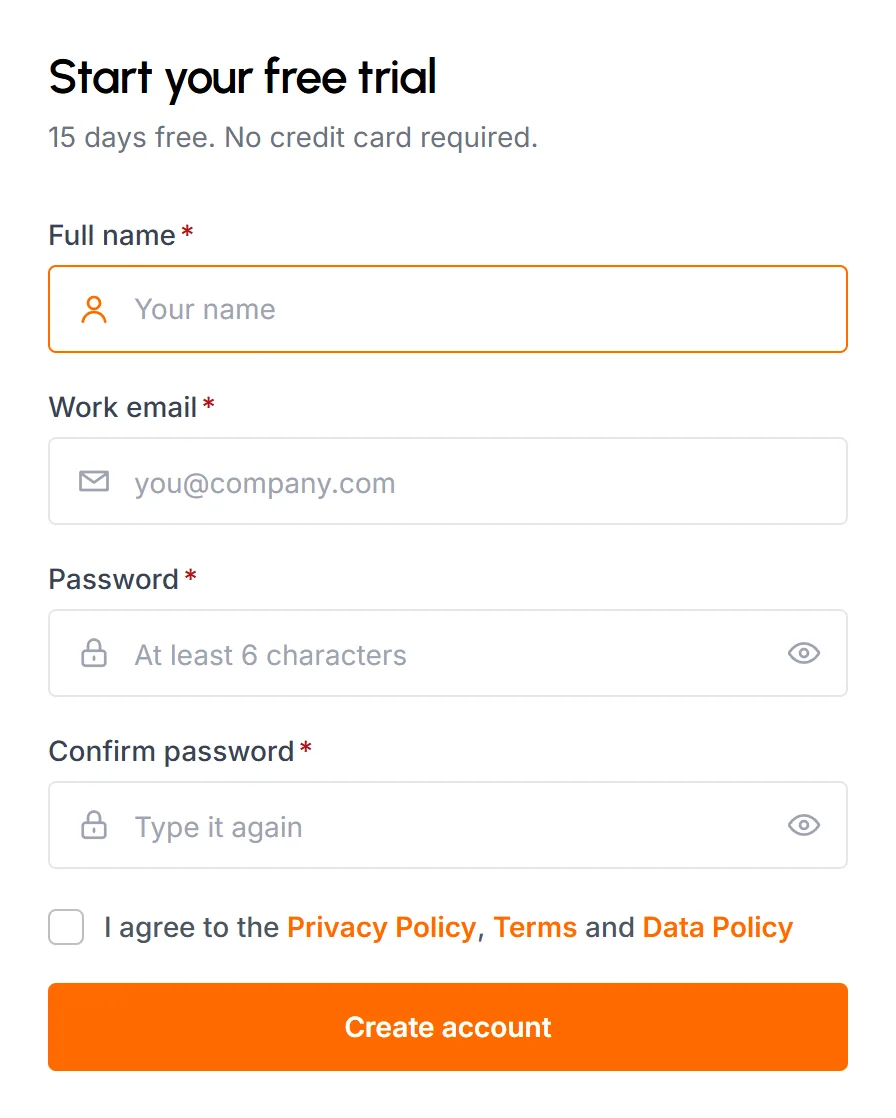
Go to the TimoDesk sign-up page. The form's title is Start your free trial.
-
Fill in your details:
- Full name
- Your name, up to 40 characters. Your team sees it in TimoDesk, and you can change it later in your profile.
- Work email
- The address you'll sign in with. It can't belong to another TimoDesk account.
- Password
- At least 6 characters. Click the eye icon to check what you typed.
- Confirm password
- The same password again. If the two don't match, the form says "Passwords do not match" and doesn't send.
-
Select the checkbox to agree to the Privacy Policy, Terms and Data Policy. You can't sign up without it.
-
Click Create account.
TimoDesk creates your account, signs you in and emails you a link to verify your address. You can verify it now, or later from the setup checklist. The organization form opens next.
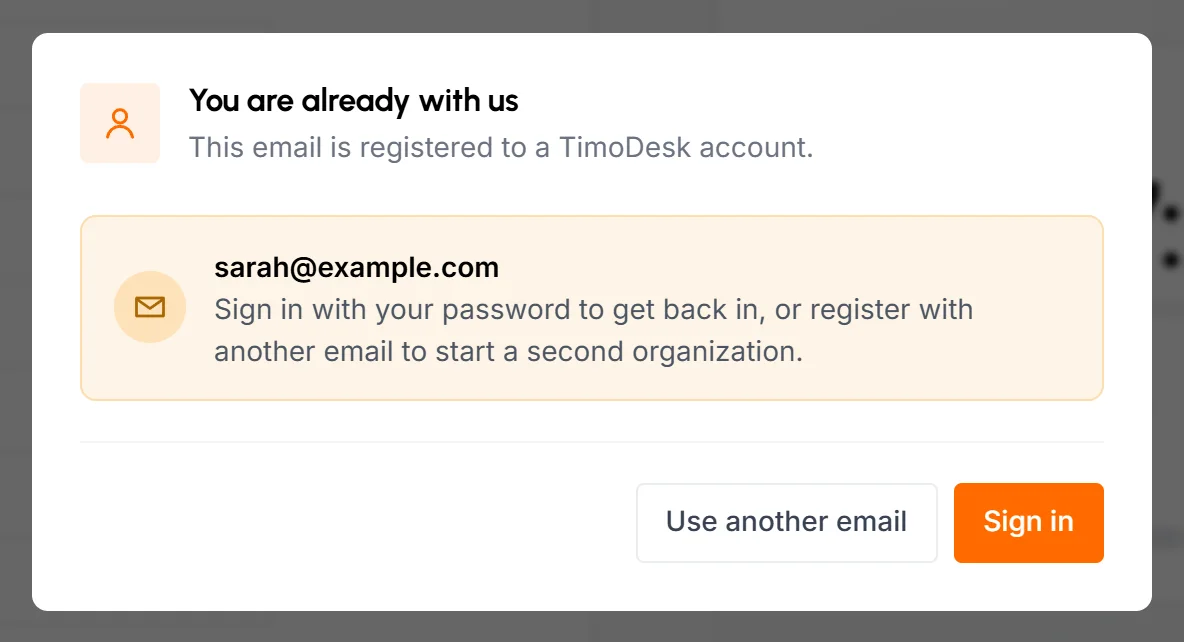
When you leave the email field, TimoDesk checks the address. If it's already registered, a You are already with us popup offers Sign in or Use another email. One email address can only belong to one account, so use a different email to start a second organization.
Another organization may have sent you a referral link. If you opened it in the same browser within the last 72 hours, the form shows a "You've been referred by" note with their name. TimoDesk links the referral to the organization you create next. See Referral program. If you also came from a TimoDesk Partner's link or used a coupon code from a partner, the partner gets the credit instead of the organization that referred you.
How to add your organization details
The Set up your organization form appears right after sign-up, and you must finish it before you can open the dashboard. If you close the page and sign in again, TimoDesk brings you back to this form. Under the form, TimoDesk shows the email you're signed in with and a Sign out link.
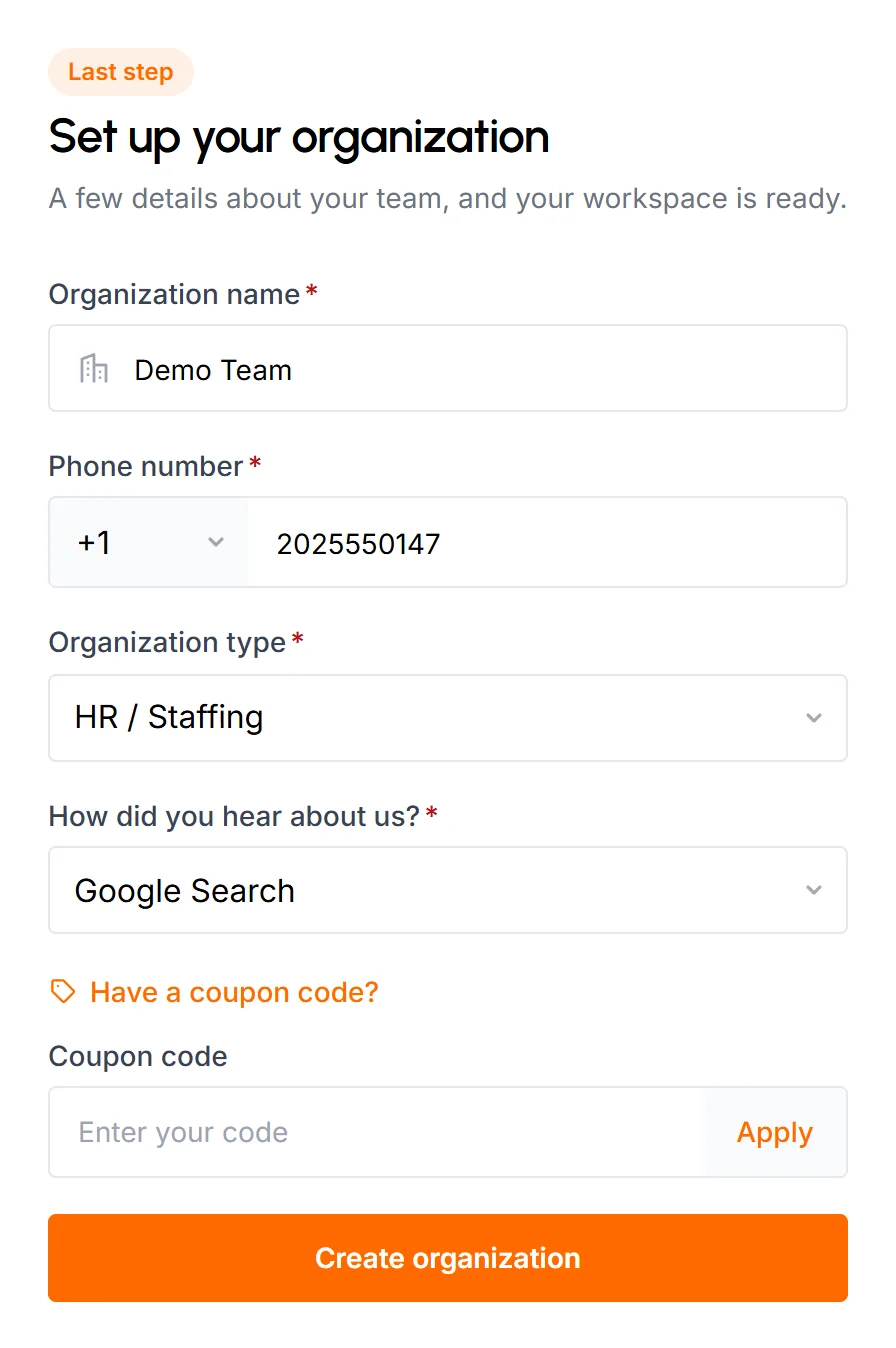
- Organization name
- Required, up to 255 characters. You can rename the organization later.
- Phone number
- Required. Pick the country code first, then type the number with digits only. TimoDesk picks a code for you based on your location, and you can search the list by country or code. Each phone number can only belong to one TimoDesk account. If the number is taken, a This number is already in use popup asks you to use another one.
- Organization type
- Required. Choose the option closest to your business, for example Technology / IT, Professional Services, Marketing & Creative Agencies or HR / Staffing. If you choose Other, a required Describe your organization field appears.
- How did you hear about us?
- Required. If you choose Other, a required Where did you hear about us? field appears.
- Coupon code
- Optional. Click Have a coupon code? to show the field, type your code and click Apply to check it. A valid code shows the discount and which invoices it covers: the next one, the next few or every invoice. An invalid code shows "Invalid Coupon". Coupon codes from TimoDesk Partners work here too.
Click Create organization. If the coupon code is invalid or used up, TimoDesk doesn't create the organization and shows an error. Fix or clear the code and try again.
What happens after you sign up?
After you create your organization, your free trial starts and the dashboard opens.
- TimoDesk creates your organization and starts your 15-day free trial. Every feature is included.
- You're the organization's Organizer, with full access. Time tracking and screenshots are already on for your account. See Roles and permissions.
- TimoDesk sets your organization's time zone from your location. Reports, days and timesheets use it. An Organizer can change it under Account > Organization Setting.
- If your coupon is valid, its discount applies to your upcoming invoices.
- The dashboard opens with the setup checklist, which takes you through the next steps.
Common questions
Do I need a credit card to sign up?
No. You sign up with your name, email and a password. Every new organization gets a 15-day free trial with every feature.
Can I create a second organization with the same email?
No. Each email address belongs to one TimoDesk account, and each account belongs to one organization. Register with a different email for a second organization.
I was invited by my company. Should I register?
No. Registering creates a new, separate organization. Use the invitation email or invite link your company sent you. An email invitation adds you with the role they picked, and an invite link adds you as Staff once an admin approves you.
Can I change the organization name later?
Yes. The Organizer can change the organization name, time zone, week start day and address under Account > Organization Setting.