
Productivity Leaders
Productivity Leaders shows the member who tracked the most time in each month of a year, and ranks the members who won the most months. From each month you can email the winner, download a Performer of the Month PDF or open their reports.
Who can use it: Organizers and Business Managers. Team Managers and Staff don't have this page.
How the monthly winner is chosen
Each month's winner is the member with the most tracked time that month, counted in your organization's time zone. Activity doesn't affect who wins.
To open the page, click Productivity Leaders under Performance in the sidebar. It opens on the current year. To see another year, pick it from the dropdown or use the arrows. The dropdown starts at the year your organization first tracked time and ends at this year.
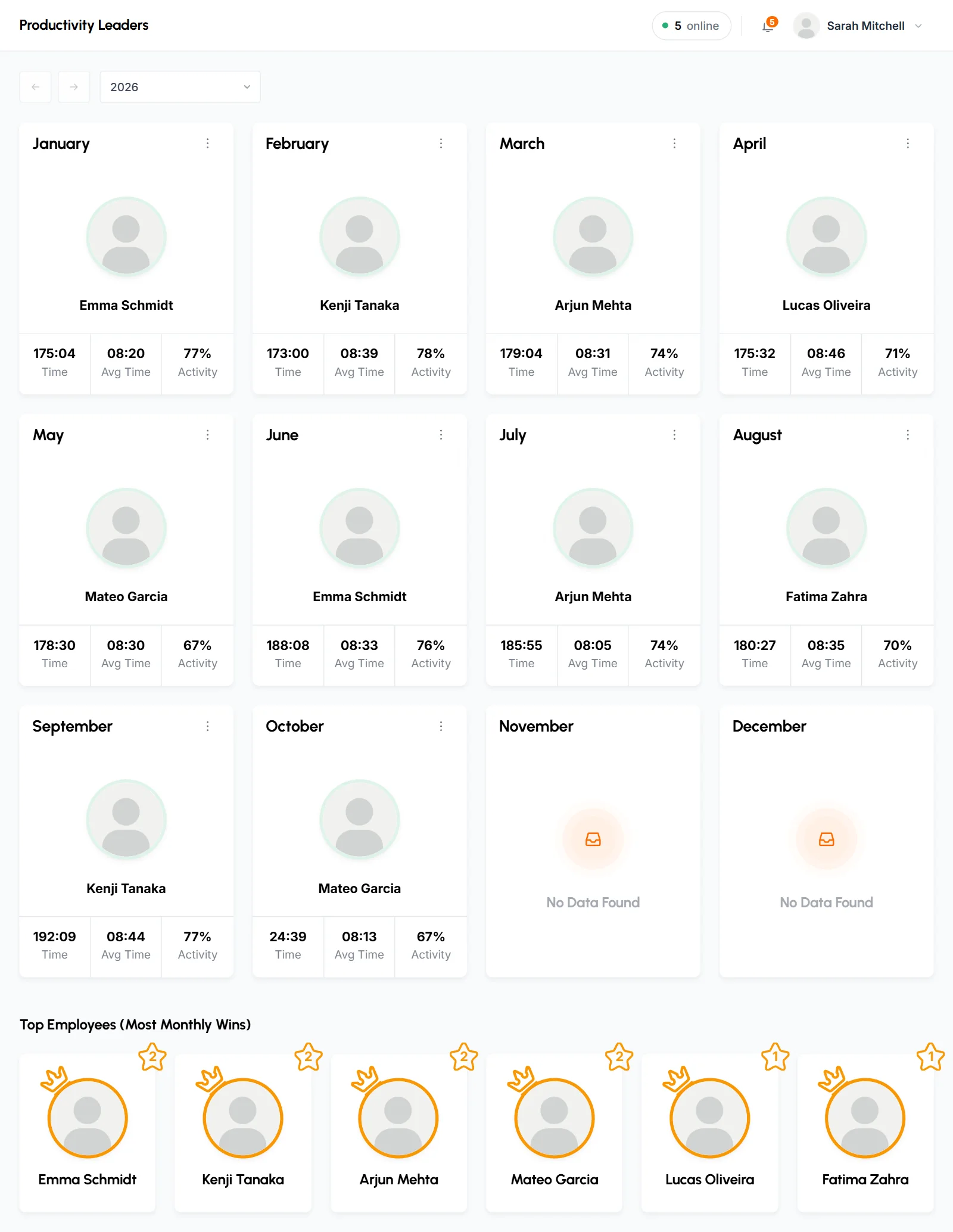
The page has one card per month, from January to December. Each card shows the winner's photo and name, plus these numbers:
- Time
- The winner's total tracked time that month, in hours and minutes.
- Avg Time
- Time divided by the number of days in that month on which they tracked any time.
- Activity
- Their average activity for the month, weighted by time and rounded down to a whole percent.
- A month with no tracked time shows "No Data Found". This includes months that haven't happened yet.
- The current month shows the leader so far. The leader can change until the month ends.
- Everyone who tracked time can win, including Organizers, Business Managers and members who are now disabled.
- Approved manual time counts toward Time. It has no keyboard or mouse input, so it's left out of the Activity number. See how time and activity are calculated.
- There's no tie-breaker. If 2 members tracked exactly the same time, the card can show either one.
How to email the winner, download a PDF or open their reports
Use the ⋮ menu next to the month name on any month that has a winner. The menu shows the winner's name and the month, then these options. Send Mail and Download use the same winner as the card.
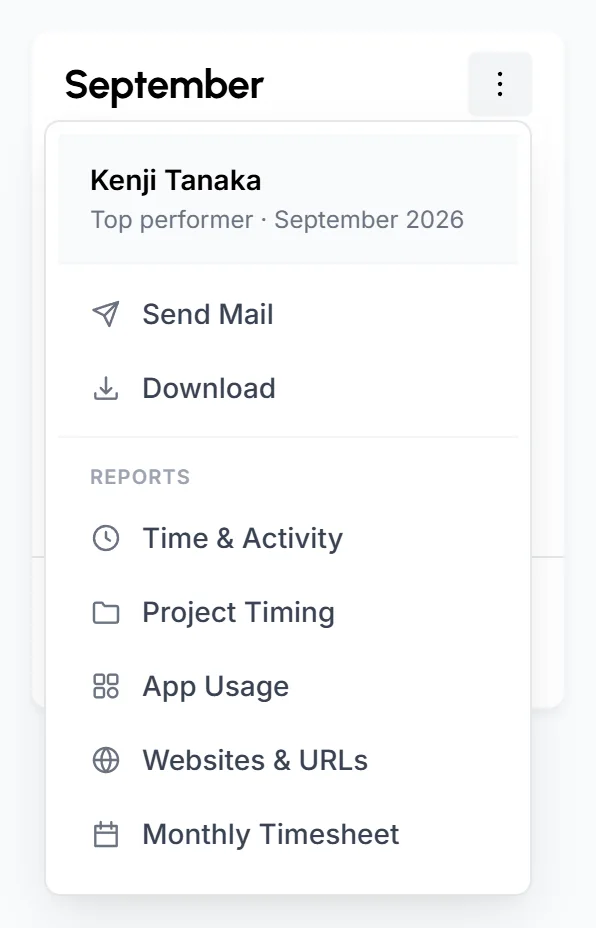
- Send Mail
- Emails the winner a congratulations message for that month. It sends right away with no confirmation. Each click sends another email.
- Download
- Downloads a "Performer of the Month" certificate as a PDF (A5, portrait), with a name like
leaderboard-9-2026.pdf. It shows your organization's name, the month and year, the winner's photo and name with a Top performer badge, and 3 figures: Time worked, Avg. activity and Days worked. - Time & Activity, Project Timing, App Usage, Websites & URLs
- Listed under Reports. Each one opens that report for the winner and that month, so you can see how they spent their time.
- Monthly Timesheet
- Opens the Monthly Timesheet for that month for the whole team.
Who won the most months this year?
Top Employees (Most Monthly Wins) lists every member who won at least 1 month of the selected year. It sits below the month cards. The star badge on each member shows their number of wins. Members with the most wins come first. Members with the same number of wins appear in the order of their first win that year.
This section appears once at least 1 month of the year has a winner.
How to use Productivity Leaders
Use Productivity Leaders to thank the member who put in the most time each month, and to see who leads month after month.
- The monthly cards show each month's top contributor. The wins list shows who comes out on top again and again.
- TimoDesk picks winners by time only. To rank people by activity, or by time and activity together over any date range, use Top Performers and Low Performers.
- Before you celebrate a win, open the winner's Time & Activity or App Usage report from the card menu to see how they spent the time.
Common questions
How is the monthly winner chosen?
The winner is the member with the most tracked time that month, including approved manual time. The card shows activity, but activity doesn't decide the result.
Why can't Team Managers see Productivity Leaders?
Only Organizers and Business Managers can use this page. Team Managers can rank their teams with Top Performers and Low Performers.
Can I send the congratulations email again?
Yes. Each click on Send Mail sends the winner another email. Click it once per month unless you want to send it again.