
Partner payouts
Partner payouts are how you get the commission you earn in the TimoDesk Partner program. Commission goes into your balance, and you withdraw it with one of the payout methods offered in your country. The TimoDesk team reviews each request and pays it by hand.
Who can use it: approved partners. Open Payments > Withdrawals or Payments > Transactions in the partner portal. To learn how you earn, see Partner program.
Where to see your balance
Your available balance shows at the top of every page, next to a Withdraw button. The Withdrawals card on the dashboard also shows:
- Available balance
- What you can withdraw now. It goes up when a commission or bonus is added, and down when you request a withdrawal.
- In progress
- The total of your pending withdrawals.
- Total withdrawn
- Everything TimoDesk has paid you.
How to read your transactions
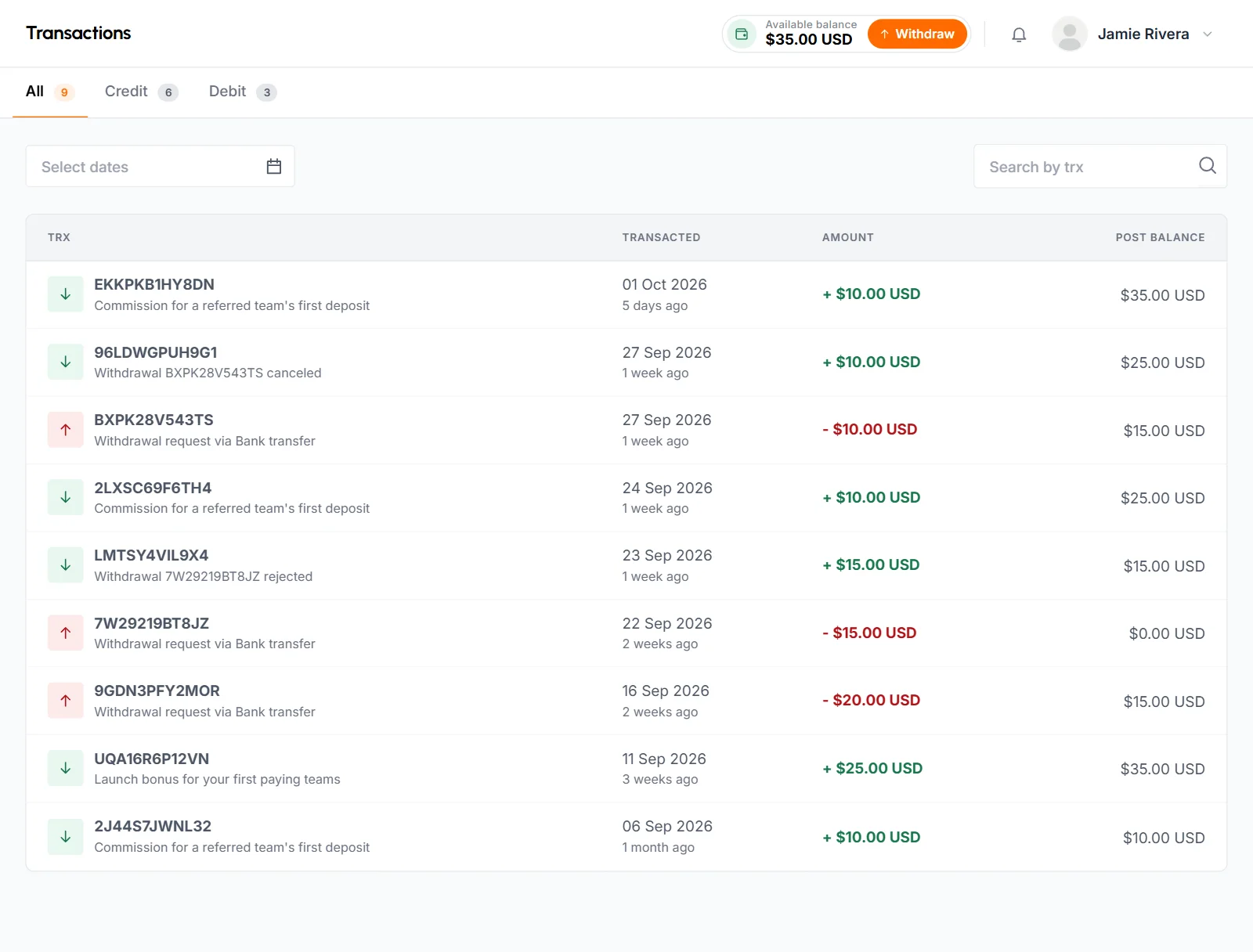
The Transactions page lists every change to your balance, newest first. Use the All, Credit and Debit tabs, pick dates, or search by transaction number.
- Trx
- The transaction number, with a line that says what it was, for example "Commission for a referred team's first deposit" or "Withdrawal request via" followed by the method.
- Transacted
- The date.
- Amount
- A plus for money in, a minus for money out, and the charge if there was one.
- Post Balance
- Your balance right after the transaction.
Credits are commissions, bonuses and amounts TimoDesk adds by hand. They also include canceled or rejected withdrawals that come back to you. Debits are withdrawal requests and amounts TimoDesk takes out by hand.
Is there a minimum withdrawal?
No. There's no minimum to withdraw. You can request any amount up to your available balance, as long as it's more than the payout method's charge.
How to request a withdrawal
-
Open the request form
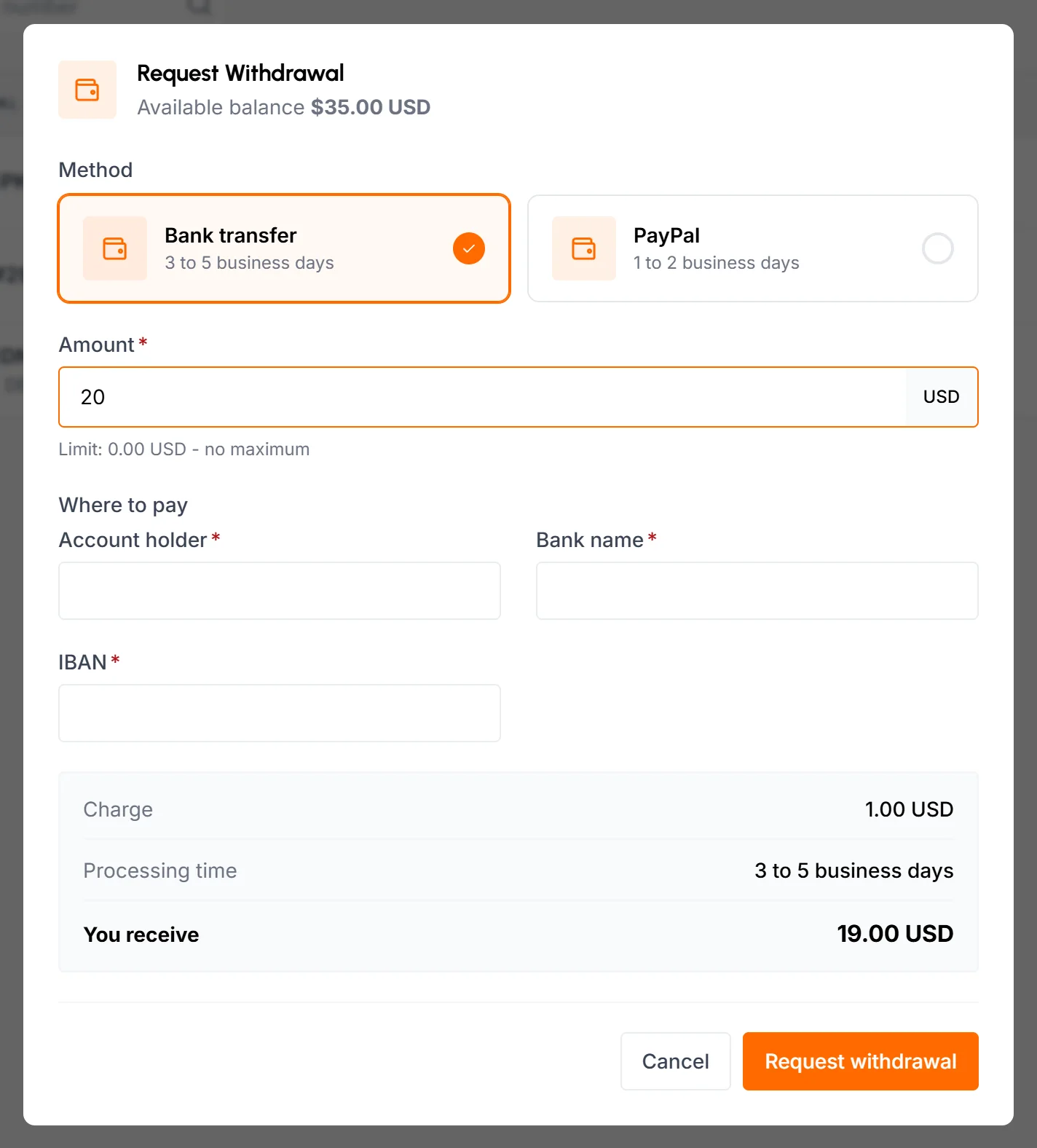
Click Withdraw at the top of any page, or open Payments > Withdrawals and click Request Withdrawal. The dialog shows your available balance.
-
Choose a method
Under Method, pick one of the payout methods offered in your country. Each one shows its processing time.
-
Enter the amount
Type the Amount. The dialog shows the method's limits, the Charge, the Processing time and what You receive after the charge. It warns you when the amount is above the method's maximum, more than your balance or not more than the charge.
-
Tell us where to pay
Under Where to pay, fill in the fields the method asks for, such as an account name or an email address. Some methods ask for a document. Upload a JPG or PNG up to 4 MB. TimoDesk doesn't save these details, so you fill them in on every request.
-
Send the request
Click Request withdrawal. The full amount leaves your balance right away, and the request shows as Pending. You get a notification and an email with the request number.
- Your email must be verified before you can request a withdrawal.
- If you already have a pending request, the dialog may say You already have a pending withdrawal. Wait until it's paid or rejected, or cancel it.
Which payment methods can you use?
You can use the payout methods TimoDesk offers in the country on your profile. TimoDesk sets up each method with its own fields, minimum, maximum, charge and processing time, and the request dialog shows them all.
- To see the methods for another country, change Country in your profile.
- If the dialog says No withdrawal method is available yet, no method is set up for your country. Click Contact support.
- A method without a maximum lets you withdraw your whole balance in one request.
What does a withdrawal cost?
A method can charge a fixed amount, a percentage of the amount or both. The charge comes out of the amount you request. For example, if you request 100 and the charge is 2, you receive 98. The dialog shows the charge and You receive before you send the request, and the withdrawal list shows both afterward.
What happens after you request a withdrawal?
The TimoDesk team reviews the request and pays it by hand to the details you gave. The Withdrawals page shows each request with its method, date, amount, charge, the amount you receive and its status.
- Pending
- Waiting for review. The dashboard shows A withdrawal is being processed while it waits. You can still cancel it.
- Paid
- TimoDesk sent the money. The row shows the payment reference, and you get a notification and an email.
- Rejected
- TimoDesk didn't pay it. The full amount, charge included, goes back to your balance, and the email gives the reason.
- Canceled
- You canceled it, and the amount went back to your balance.
Click the details button on a row to see the Amount, what You receive, the Charge, the Payment reference, the Paid on date, the Payout details you entered and any Note from the team.
How to cancel a withdrawal
You can cancel a withdrawal while it's still Pending. On the Withdrawals page, click the cancel button on its row, then Cancel Withdrawal. The amount goes back to your balance right away. Once a request is paid or rejected, you can't cancel it.
Common questions
How long does a payout take?
Each method shows its processing time in the request dialog. TimoDesk reviews and pays every request by hand, and you get an email when it's paid.
Why can't I click Request withdrawal?
You already have a pending request, or no payout method is set up for your country. The dialog says which.
Can I save my payout details?
No. You enter them on each request, and TimoDesk pays to the details on that request.
Can I withdraw while my account is suspended?
No. Payments pages are hidden while your account is suspended, but the commission already in your balance is kept.
Can I use my partner balance to pay my own TimoDesk invoices?
No. Your partner balance is paid out with a payout method. It isn't connected to any TimoDesk organization's account credit.