Time tracking for staffing and talent agencies
TimoDesk is time tracking and employee monitoring software for staffing and talent agencies. It records hours, activity and screenshots for every remote hire you place, and gives each client a login for their own projects. $1 per user per month.
Show your client the work they pay for
Your client pays for a remote hire they never see at work. They want to know that person is doing the job. You want to answer with a report, not a phone call. TimoDesk records the work for $1 per user per month, so tracking adds very little cost to each placement. If you place virtual assistants, see TimoDesk for VA agencies.
Every tracked hour comes with proof
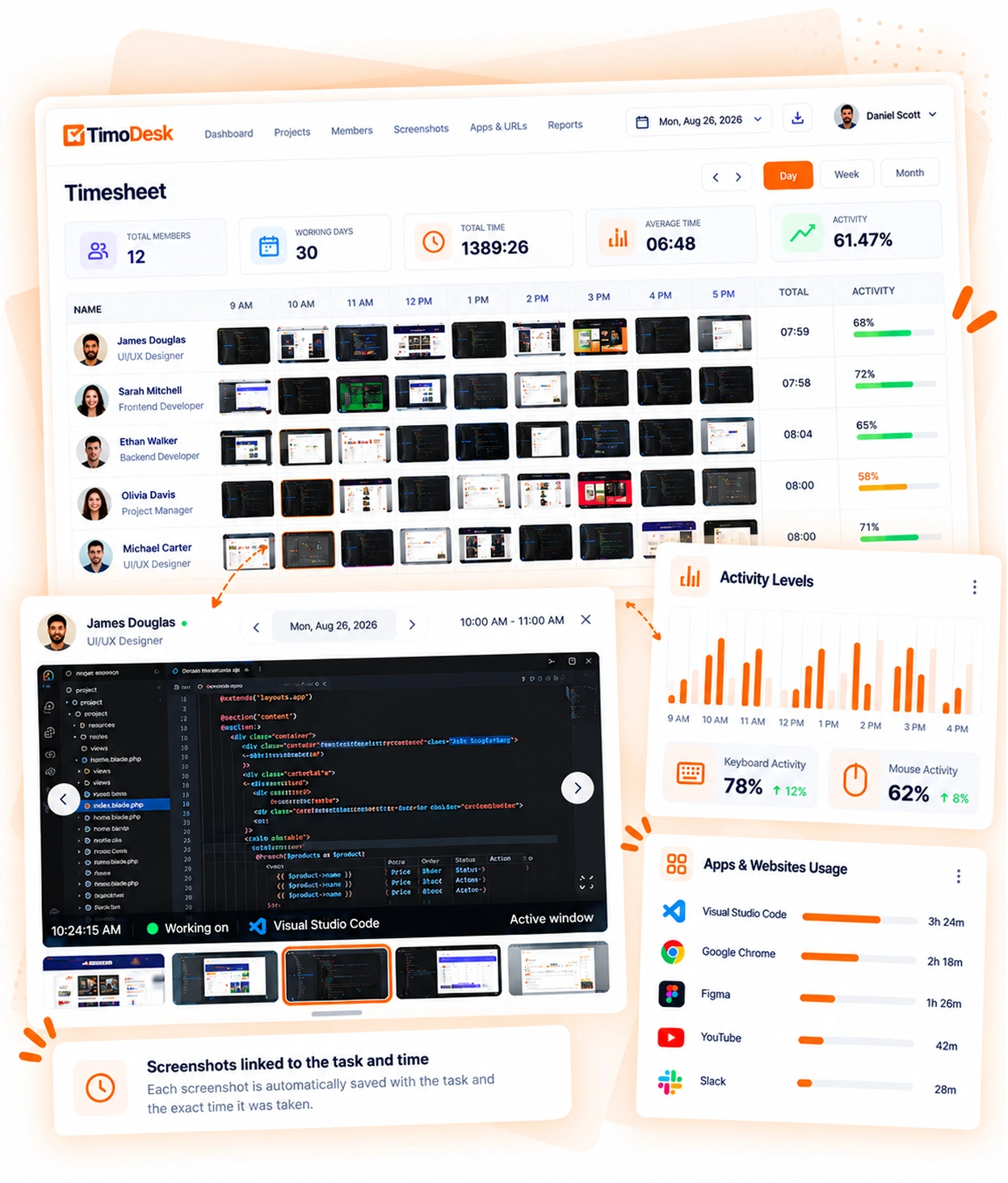
Each screenshot is saved with the task being worked on. Activity levels are recorded for every session. That lets you show a client more than a timesheet. It's built on screenshots, activity levels, and timesheet exports.
-
Screenshots linked to the task and the time Each screenshot is saved with its task and the time it was taken.
-
Activity levels from keyboard and mouse use See how often the keyboard and mouse were used, never what was typed.
-
App and website usage for each member See which apps and websites each person used while the timer ran.
-
Screenshot settings for everyone or one member Screenshots start on for new hires. Set them per hire, or for many at once.
Client reports that are ready to send
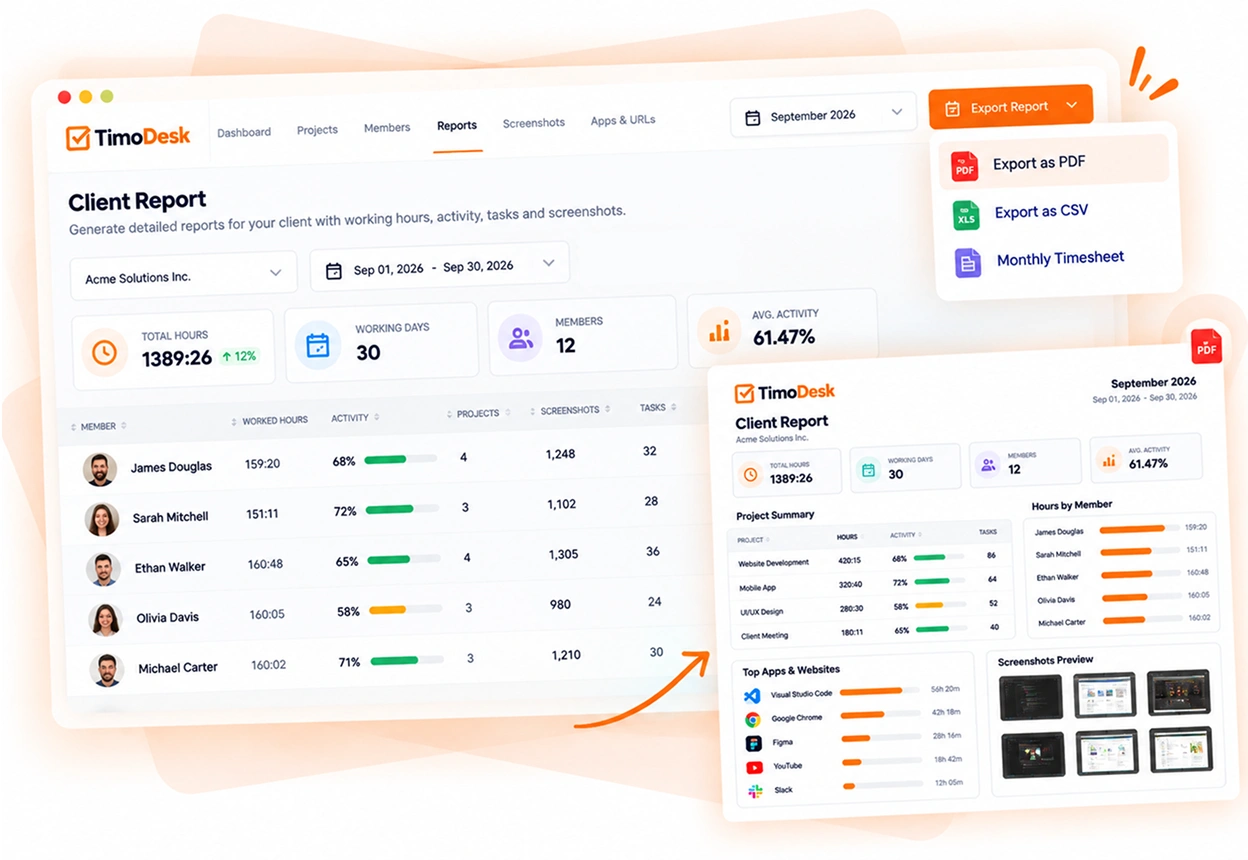
Time and activity reports download as PDF or CSV, and monthly timesheets as PDF. You send the record with the invoice, and nobody has to build it by hand on the last day of the month.
- Project reports for one client at a time
- Monthly timesheets exported as PDF
- Time and activity reports in PDF or CSV to attach to the invoice
- Project timing that shows the hours as they add up
What a client login shows
A client login gives an outside company access to part of your account. Here is what they can and cannot see. The client portal page has the full details.
Only the projects you assign
- A dashboard of their projects, with your logo and name
- Time and activity by day, member or project, plus project timing, a weekly worklog and a time calendar
- Tasks and a read-only kanban board
- Screenshots, apps and websites, which are off until you turn them on
- Reports to download as PDF or CSV, with your logo on the PDF
The rest of your organization
- Your other clients
- Projects not assigned to them
- Time and screenshots from other projects
- Your billing and settings
You decide what each client sees
- Which projects each client can open
- Which screens they get besides the dashboard
- Hiding your team members' names and photos
- Invitations that last 7 days, to resend or withdraw
- Turning their access off at any time
- When each client last signed in
Staffing agency questions
What staffing agencies ask before they use TimoDesk with their remote hires and their clients.
How do staffing agencies track remote employees for clients?
With a desktop app on each remote hire's computer. TimoDesk records hours against the client's project and task, with activity levels and screenshots. You can export the monthly timesheet as a PDF and send it with your invoice.
Can my clients log in and see the hours?
Yes. You invite each person at the client by email, and each one gets their own login that shows only the projects you assign. Every client sees a dashboard. You choose the other screens, such as projects, time and activity, tasks, screenshots, and apps and websites. Screenshots, apps and websites are off for a new client until you turn them on.
Can a client see my other clients?
No. A client login shows only the projects assigned to it. Your other clients, other projects and the rest of your organization stay hidden.
Can someone on my staff see only their own placements?
Yes, with the team manager role. Put their placements in a team and make them its team manager, and they see only the teams they manage. Organizers and managers see the whole organization.
Do remote hires know when they are being tracked?
Yes. The desktop app shows when tracking is on, and each member can see their own hours and activity. You can also turn on an alert that tells them when a screenshot is taken.
How much does TimoDesk cost per placed hire?
$1 per user per month, on one plan. You're billed monthly after the month ends, and only for members who tracked time in the desktop app. When a placement ends, that person drops off the next bill.
Time tracking for other teams and needs
Every team gets the same tracking and reports. Pick the page that matches your team or what you need to solve.
- Virtual assistant agencies Hours for each client a VA works for
- Agencies and studios Track hours on every client project
- Software and IT teams See where the sprint time went
- Consultants Bill each client from a PDF timesheet of tracked hours
- Remote and distributed See your team's work without a status meeting
- Hybrid teams The same tracking on office days and home days
- In-house teams Spot uneven workload while you can fix it
- Proof of work Show clients what was done, backed by tracked hours
- Productivity and accountability Review conversations based on data both sides can see
- Workload and burnout See who is overworked before they leave
See where your team's hours go
Setup takes a few minutes. Install the desktop app and start a timer. Tracked time shows on the dashboard the same day, and the first full-day reports are ready the next day.
- $1 per user / month
- Windows, macOS and Linux