Manual time with approval
When the timer was off, members ask for the time they worked. A reviewer approves or rejects it, and approved time stays marked as manual.
Manual time
Missed time, added with a review
Hubstaff, Time Doctor, Toggl Track and Clockify keep manual time approval for higher plans. TimoDesk has it on its one plan at $1 per user per month. A member asks for time the app missed, and a reviewer decides. It sits next to your tracked time in the timesheets, marked as manual, so your proof of work holds up. For step-by-step help, see the Manual time guide.
Requesting time
Ask for the time the app missed
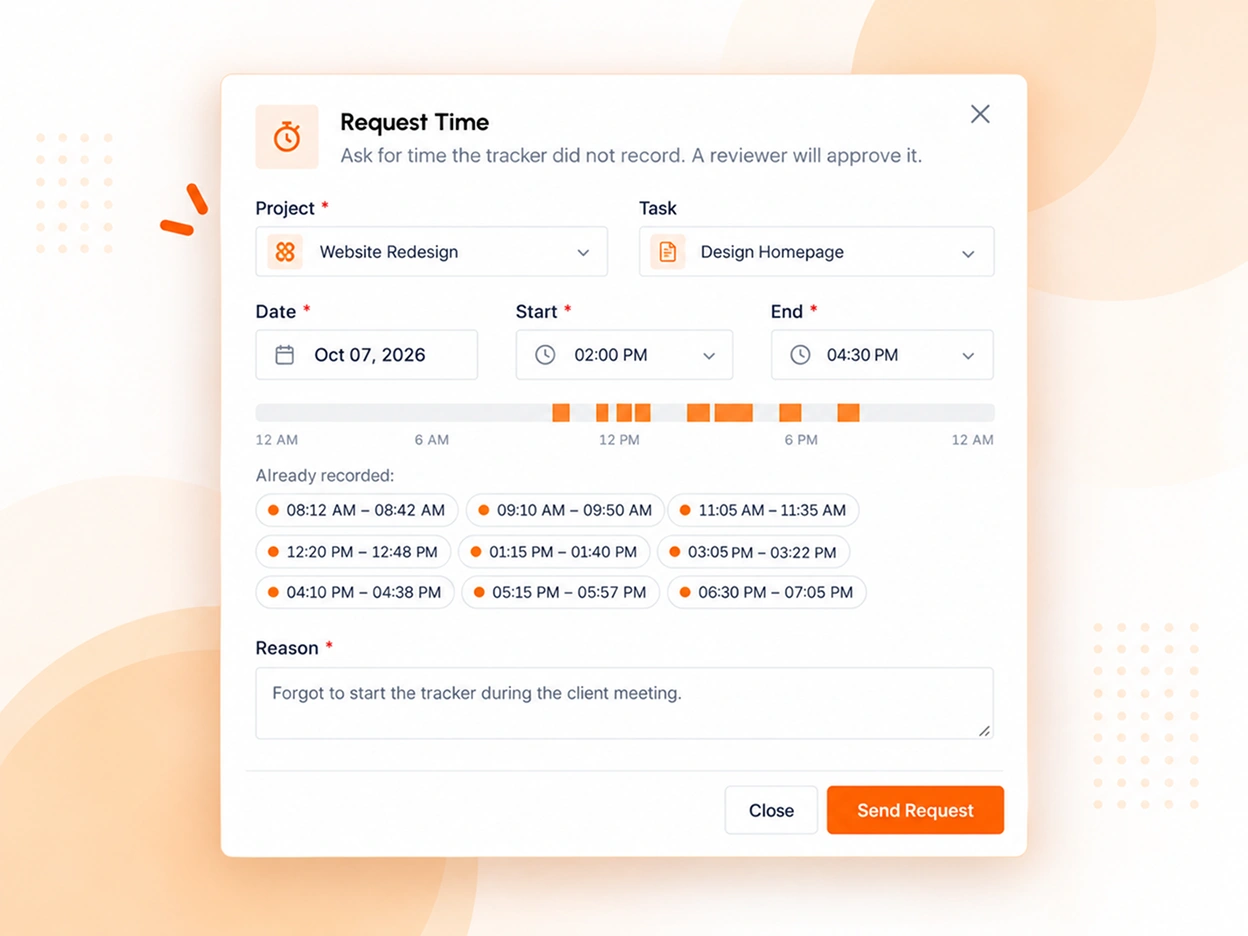
Maybe the desktop app was closed during a client call. The member opens Manual Time in the dashboard, picks the project and task, sets the date with a start and end time, and says why. The form shows what is already recorded that day, so gaps are easy to spot.
- Only projects and tasks they are on, or have tracked on before
- No overlap with recorded time or another waiting request
- No future time, and at most 12 hours in one entry
- Edit or cancel a request while it still waits
Reviewing requests
Approve, change or reject
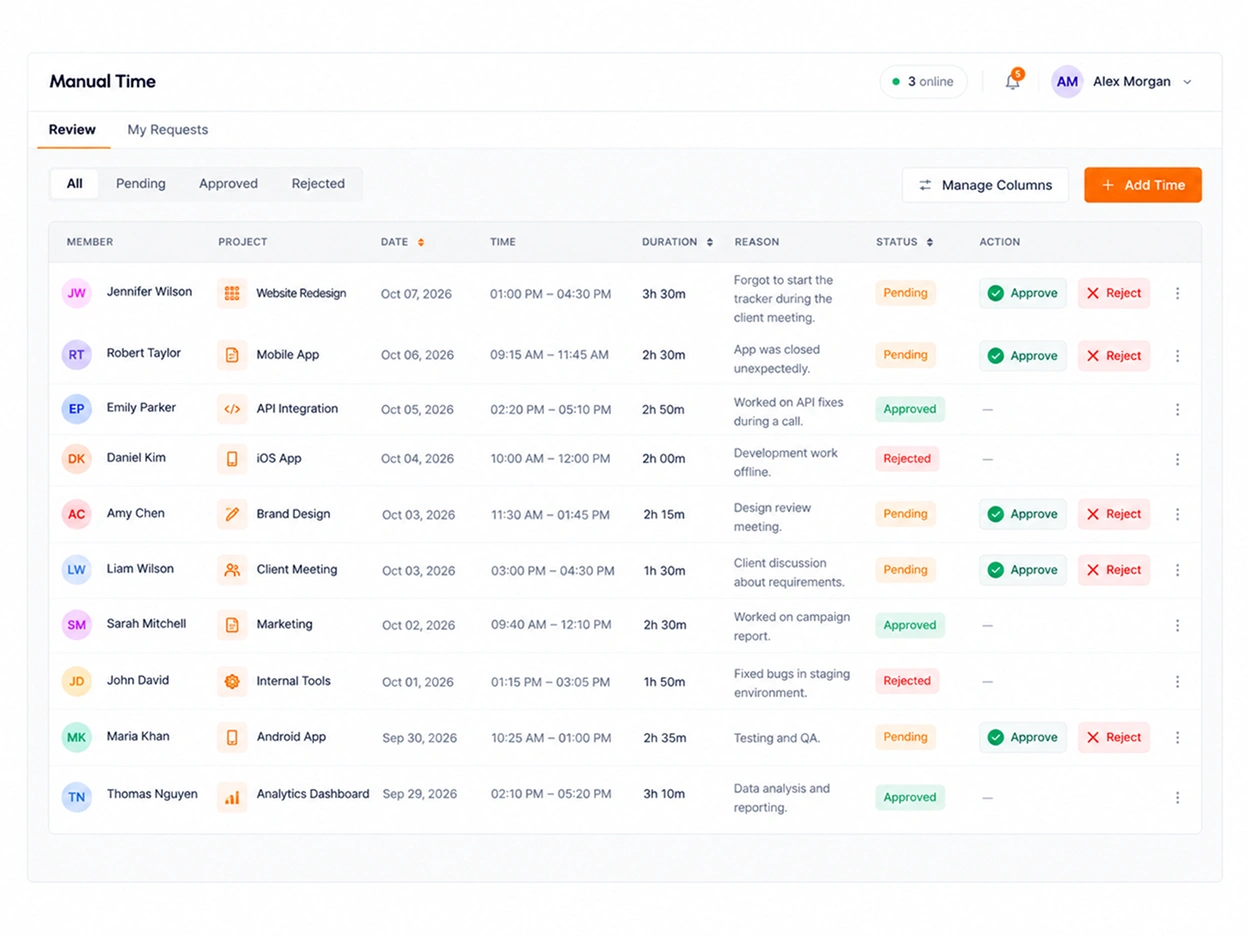
Reviewers get a notification and a queue with what still waits at the top. They can approve a request as asked, fix the time, project or task first, or reject it with a note. The member is told either way.
- Reviewers are organizers only, managers too, or team managers for their own teams
- Managers can't approve their own time; only the organizer can
- When a reviewer changes a request, the member still sees what they asked for
- Approved time can be changed or removed later, and the record stays
- Reviewers can also add time for a member directly
Rules and limits
Set the rules once
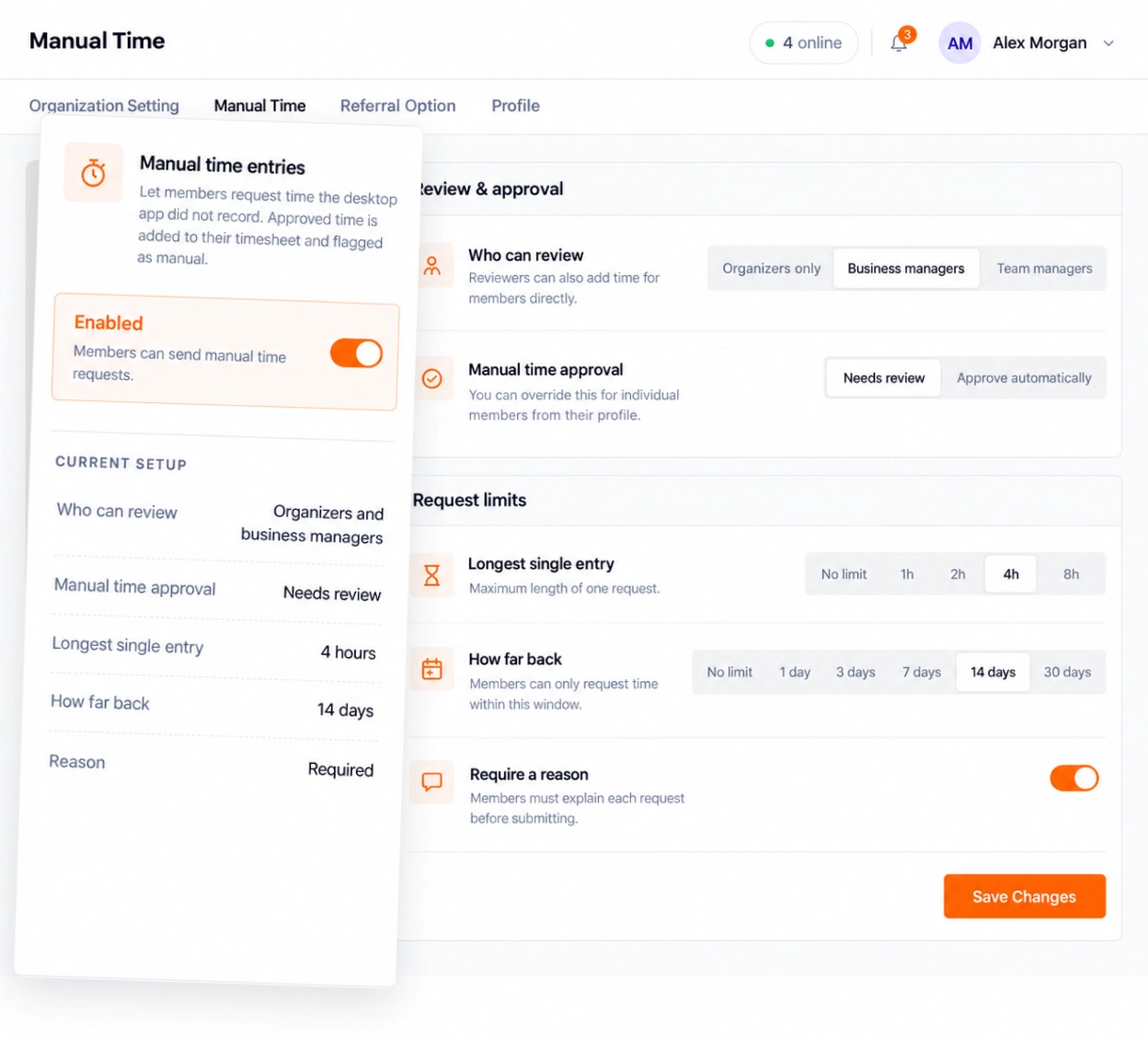
Manual time is off until the organizer turns it on in the organization settings. The same page sets who reviews, how approval works and how much members can ask for. The limits apply to member requests.
- Review each request, or approve them automatically
- Longest single entry: 1, 2, 4 or 8 hours, or no limit
- How far back: 1, 3, 7, 14 or 30 days, or no limit
- Require a reason with every request, on by default
- Turn manual time off, or set approval, for one member
Tracked time is never edited
No one can change time the desktop app recorded, the organizer included. Manual
time is added beside it and always stays marked as manual.
Questions
About manual time
Who can add time, who approves it, and how it shows in your reports.
Can members add time the app did not track?
Yes, by sending a request. In the TimoDesk dashboard they pick the project, the date, the start and end time, and give a reason. A reviewer then approves or rejects it, unless approval is set to automatic.
Who can approve manual time?
The organizer decides. Reviewers can be organizers only, organizers and managers, or also team managers for the teams they manage. Managers can't approve their own time; only the organizer can.
Can anyone edit time the app tracked?
No. Time the desktop app recorded can't be edited by anyone, the organizer included. Manual time is added as separate entries, and it can't overlap time that is already recorded.
How can I tell which hours were added by hand?
Manual time is always marked as manual. On the screenshots page it shows as "Added by hand, not tracked", and the team dashboard timeline marks it too. It has no activity, so it is left out of activity averages.
Can I limit how much time members request?
Yes. You can cap one entry at 1, 2, 4 or 8 hours, and allow requests from the last 1, 3, 7, 14 or 30 days. Either can be set to no limit. One entry is never longer than 12 hours.
Is manual time on every plan?
Yes. TimoDesk has one plan at $1 per user per month, and manual time with approval is part of it. It stays off until the organizer turns it on.
More features
More TimoDesk features
Each feature has its own page that explains what it does and what it doesn't do. All of them are on the same plan.
- Time tracking Time tracked while the work happens
- Project management Kanban boards with time on every card
- Project time tracking Every hour saved to its project and task
- Team dashboard Your team's day and what needs you
- Time calendar Each member's hours by day, week and month
- Screenshots Screenshots linked to each task
- Activity levels Keyboard and mouse activity, never keystrokes
- App and website usage Which apps and websites were used
- Timesheets and exports Monthly timesheets you can bill from
Start tracking time this week
Create your organization and invite your team today. Tracked time shows on the dashboard the same day, and the first full-day reports are ready the next day. $1 per user per month, with every feature included.
- $1 per user / month
- 15-day free trial, no card
- Stop anytime. No contract.
