Time tracking reports, ready to read
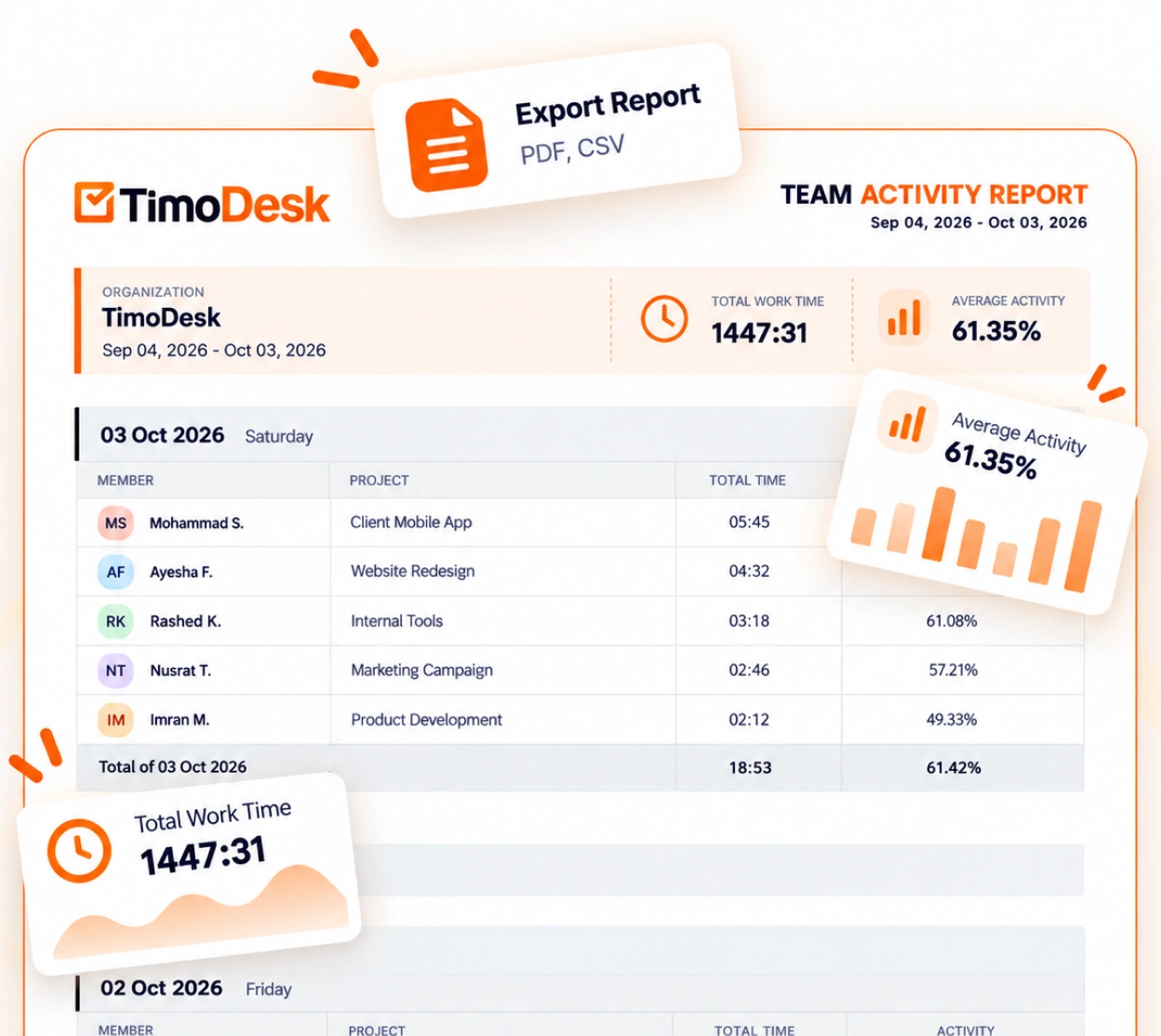
TimoDesk reports show tracked time, activity and project timing for each member, updated as your team works. Daily and weekly summary emails keep managers of remote teams informed.
Reports and analytics
Most report builders make you do the work
Many tools give you a report builder, and twenty minutes later you have the report you already knew you wanted. TimoDesk skips that step, because managers ask the same few questions. Every report is on one plan at $1 per user per month, for staffing agencies, remote teams and productivity and accountability. For step-by-step help, see the Dashboard and Time and activity guides.
Overview
Reports that are ready to use
Total time tracked, average activity, the trend for both, and the details under them. There is nothing to set up, and timesheets and exports use the same numbers.
- Total time tracked and average activity, with the trend
- Time and activity reports per member and per project
- Member timing and project timing side by side
- Summary statistics for whichever period you choose
One source for every number
Reports, timesheets, and the team dashboard all use the same tracked sessions.
Two people can't get different numbers from two different screens.
Common questions
Four questions, already answered
Managers ask these questions every week. Each one already has a report, so you get the answer in one click instead of an hour of work.
- 01 Where did the team's time go this week? Overview and member timing Total tracked time with its trend, then the same number split per member, for any period you choose.
- 02 Which project is using the most time? Project timing Hours on each project as they add up, so you see a project going over while the work is still going, long before the invoice.
- 03 Does anyone have too much work? Per-member hours and activity Tracked hours and activity for each person, day by day. This is where extra evening and weekend work shows up first.
- 04 Did anything happen yesterday I should know about? The daily and weekly summary emails The daily email covers the previous day, and the weekly email sums up the week. Both arrive automatically, so you get the answer before you need to ask.
TimoDesk has no custom report builder, and we don't plan to add one. If your reports need a query language, TimoDesk is not the right tool for you, and we want to say so here.
Questions
About reports and analytics
Including what the reports can't do, which is worth reading first.
Are TimoDesk reports real time?
Yes. Reports update as your team tracks time, so the overview includes work that is still in progress, not only yesterday's numbers.
Can I export time tracking reports?
Yes. The time and activity report, app usage, websites and URLs, and the top and low performer lists download as PDF or CSV. The monthly timesheet downloads as PDF, overall or per member. Project timing, member timing, the weekly worklog and the time calendar have no export. Clients can also get their own login that shows only their projects.
Do I get summaries by email?
Yes. Everyone who tracked time gets a daily summary email that covers the previous day. A weekly summary arrives on the first day of your organization's work week. You don't need to open the dashboard to know if something needs attention.
Can I build custom reports?
No. There is no custom report builder. The built-in reports answer what managers ask every week: where the time went, which project used it, who has too much work, and what happened yesterday.
Can I see who is working right now?
Yes. Organizers, managers and team managers can see who is online now. On the team dashboard, Live Now shows who is working and the Team Day timeline shows how the day is going. The Action Center flags overdue tasks, low-activity members, long workdays, tasks over estimate and manual time waiting for approval.
Is reporting a paid upgrade?
No. Reporting is on the single plan at $1 per user per month, like everything else. There is no tier above the one you are on.
More features
More TimoDesk features
Each feature has its own page that explains what it does and what it doesn't do. All of them are on the same plan.
- Time tracking Time tracked while the work happens
- Project management Kanban boards with time on every card
- Project time tracking Every hour saved to its project and task
- Manual time Request and approve time the app missed
- Team dashboard Your team's day and what needs you
- Time calendar Each member's hours by day, week and month
- Screenshots Screenshots linked to each task
- Activity levels Keyboard and mouse activity, never keystrokes
- App and website usage Which apps and websites were used
Start tracking time this week
Create your organization and invite your team today. Tracked time shows on the dashboard the same day, and the first full-day reports are ready the next day. $1 per user per month, with every feature included.
- $1 per user / month
- 15-day free trial, no card
- Stop anytime. No contract.
