Spot overwork and uneven workload early
TimoDesk shows managers the workload behind burnout: tracked hours for every day, weekend work, and who is carrying the most. You see the pattern while there is still time to change it.
The resignation nobody expected
Someone has been working until 9 p.m., working on Sundays, and taking on the work nobody else picked up. None of it appeared in a report, so nobody talked about it. Then they resigned, and it was clear the signs had been there the whole time. TimoDesk puts that pattern in a report for $1 per user per month.
Long hours that nobody mentions
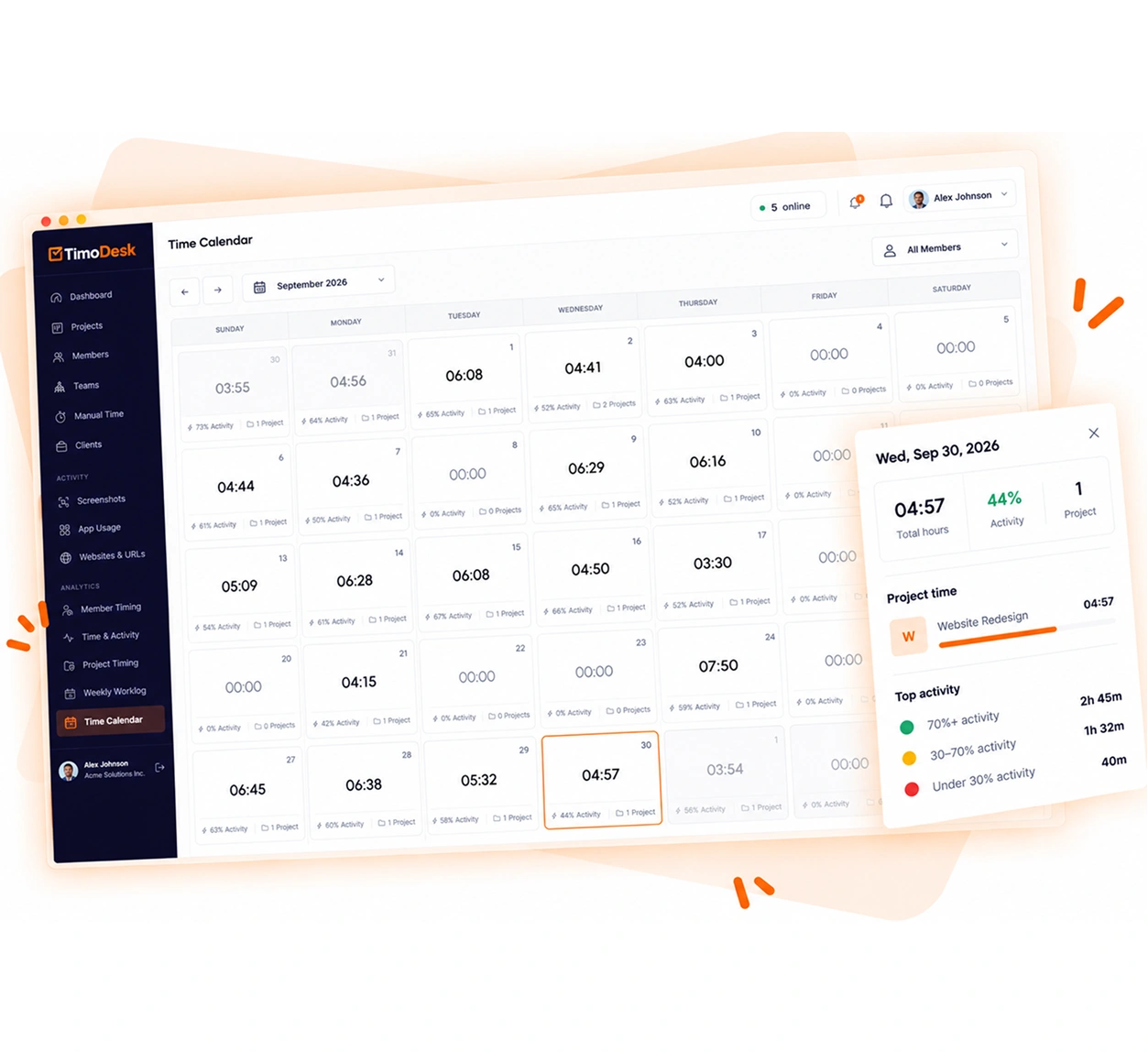
The time calendar shows each person's tracked hours for every day of the month, weekends included. Long days and weekend work show up there long before anyone talks about them. It's built on reports and analytics, activity levels, and the time calendar.
-
Tracked hours for every day, weekends included The time calendar shows each person's hours for the whole month.
-
Morning, afternoon and evening split for each member Each member sees how their own work splits across the day.
-
Total tracked hours, week by week Weekly worklogs show how each person's hours change over time.
-
Tracked hours count only time worked Hours come from the running timer, not from how long an app was open.
Who is doing the most work
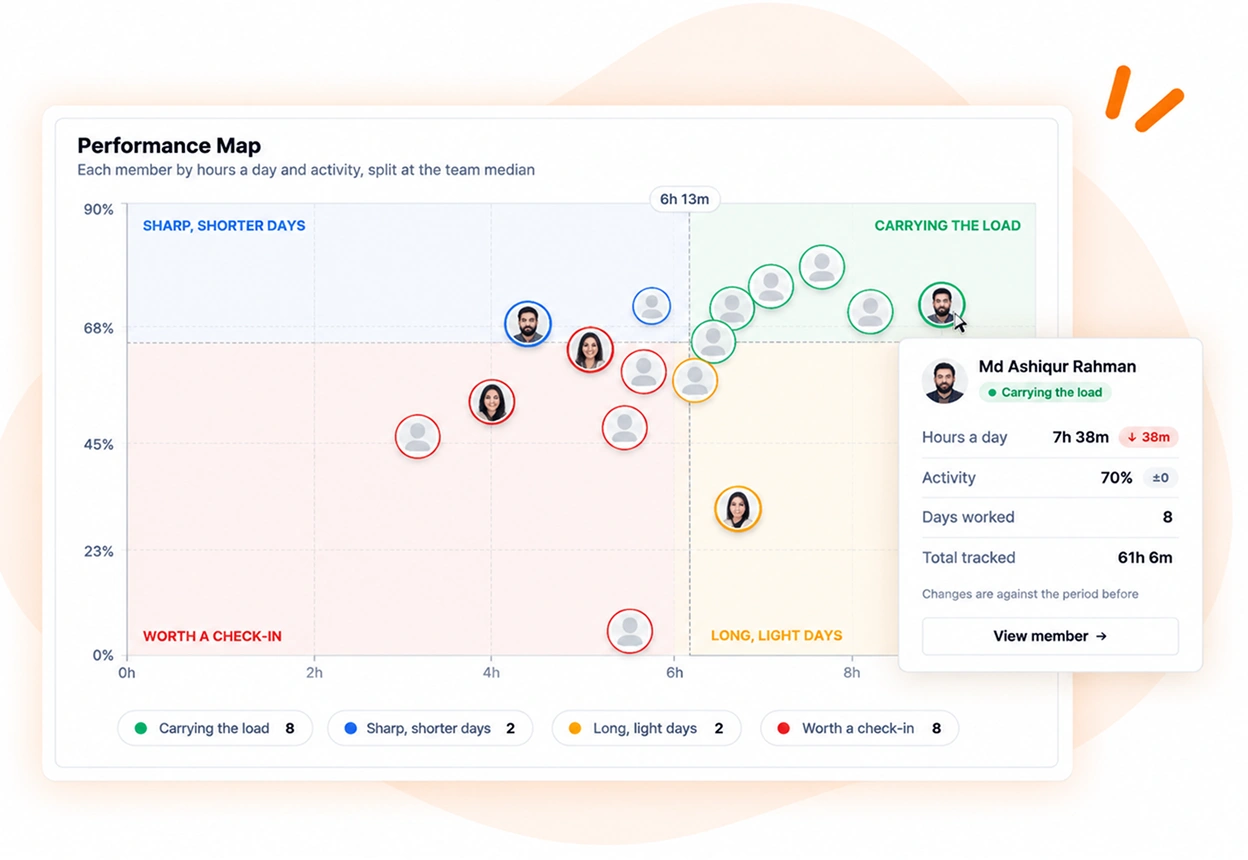
Member reports show how the work is spread across the team. If three people carry most of the load, you can see it before one of them leaves.
- Tracked hours and activity for each member
- Member timing across every project
- Top and low performer lists to read yourself, with nothing flagged for you
- Daily summary emails about the day before
- A performance map of hours and activity on the team dashboard
What TimoDesk does not do
Tracking hours to protect people needs care. Software that claims to understand more than it measures makes that harder. TimoDesk measures hours. You decide what they mean.
- No burnout score
- Nothing here grades anyone's wellbeing or gives them a score for it.
- No risk alerts
- No alert decides that someone is at risk. The team dashboard lists days over 10 hours, and a person reads the pattern and makes the decision.
- No GPS or geofencing
- TimoDesk does not follow where anyone was when they worked.
- No content capture
- Activity counts keyboard and mouse use. It does not record what was typed, and there is no keystroke logging.
Workload tracking questions
Tracking hours to protect people needs care. These are the questions to ask before you start.
Can time tracking cause burnout?
It can, if you use it to police people. If you use the same data to find overload and share the work more evenly, it helps. That choice is up to managers.
Does TimoDesk flag burnout automatically?
No. There is no burnout score and no alert that says someone is at risk. TimoDesk shows hours and how they are spread, with days over 10 hours listed on the team dashboard, and a person draws the conclusion.
Can employees see their own work patterns?
Yes. Each member's dashboard shows their own hours, an activity heatmap, their most active hour, and how their work splits across mornings, afternoons and evenings.
Does TimoDesk record hours outside work time?
Yes, whenever the timer is running. Here that helps, because evening and weekend work is what you want to see.
How much does workload tracking cost?
$1 per user per month, with every feature on one plan. There's no seat minimum and no annual contract.
Time tracking for other teams and needs
Every team gets the same tracking and reports. Pick the page that matches your team or what you need to solve.
- Staffing and talent agencies Proof of work for every hire you place
- Virtual assistant agencies Hours for each client a VA works for
- Agencies and studios Track hours on every client project
- Software and IT teams See where the sprint time went
- Consultants Bill each client from a PDF timesheet of tracked hours
- Remote and distributed See your team's work without a status meeting
- Hybrid teams The same tracking on office days and home days
- In-house teams Spot uneven workload while you can fix it
- Proof of work Show clients what was done, backed by tracked hours
- Productivity and accountability Review conversations based on data both sides can see
Start tracking time this week
Create your organization and invite your team today. Tracked time shows on the dashboard the same day, and the first full-day reports are ready the next day. $1 per user per month, with every feature included.
- $1 per user / month
- 15-day free trial, no card
- Stop anytime. No contract.
